There's a specific kind of friction that shows up in group settings: nobody wants to be the one who decides, and nobody wants to be seen as picking favorites. Who goes first? Who gets called on? Who wins the prize? These are trivial questions individually, but they add up to a lot of low-grade social awkwardness over time.
A spin the wheel generator sidesteps all of that. You list your options, hit spin, and a mechanism nobody in the room controls makes the call. It's quick, it's visible, and — maybe most importantly — nobody can be blamed for the outcome.
Below, we'll unpack how the randomness is actually calculated, walk through setting one up, look at who's using these tools in 2026, and share a handful of tips that make the results more useful, not just more fun to watch.

A spin wheel generator is a free, browser-based tool that turns a list of options into slices on a circle. Clicking spin runs a random calculation that lands on one slice — no login, no download, no cost.
1. What a Spin Wheel Generator Actually Is
Think of it as a digital stand-in for the wheels used on classic game shows, except you decide what goes on it. Type in names, dish ideas, dares, raffle tickets — whatever you're choosing between — and each entry becomes a colored wedge.
It runs entirely in the browser. There's nothing to install and nothing to configure beyond your list of options, which is a big part of why the format has spread well beyond classrooms into offices, livestreams, and casual group chats.
What keeps people coming back to the wheel format specifically — rather than, say, a random number spat out silently — is that everyone watching sees the exact same process unfold at the exact same time. That shared moment is what makes the result feel earned rather than arbitrary.
2. What's Happening Behind the Spin
It's fair to wonder whether an on-screen wheel is really random, or whether it just puts on a good show. Here's the mechanical reality.
Where the number comes from
When you press spin, the page calls the browser's built-in random number generator to produce a value, which gets converted into a landing angle on the wheel. That single number is what ultimately decides the winning slice.
This isn't the kind of "true" randomness you'd get from radioactive decay or atmospheric noise — it's algorithmic, or pseudo-random. But for practical purposes it behaves exactly like a fair draw: each spin is independent of the last, and every slice keeps the same odds unless you've intentionally stacked the deck.
Even odds, by default
Every entry starts on level footing — adding more names shrinks the slices, not the fairness.
Stacking the odds on purpose
Repeat an entry to give it a bigger slice — handy for loyalty-based prize draws.
A process people can watch
Nothing happens off-screen — the spin itself is the evidence that nobody tampered with it.
That clicking sound
The rattle as it slows down isn't decorative — it's what keeps a room's attention on the screen.
The result is locked in the instant the spin begins — everything you watch after that is just the wheel catching up visually to a number that's already been chosen. That's actually what makes it hard to game: there's no window during the animation where anyone could influence where it lands.
3. Building Your First Wheel
You can have a working wheel ready in well under two minutes:
-
Load the page
Head to spinthewheelsonline.com — no account, no install, and it works the same on a phone as it does on a desktop.
-
Type or paste your list
Names, options, categories — whatever you're deciding between. There's no meaningful ceiling on how many you can add.
-
Tweak the settings if you like
Swap colors, mute the sound, stretch or shorten the spin length, or duplicate an entry to weight it. You can save the setup for next time.
-
Hit spin
Watch it slow down and settle — the winning entry gets highlighted and read out automatically.
-
Decide what happens to the winner
Flip on "remove after spin" if repeats aren't allowed, then run it again for the next round.
4. Who Reaches for a Wheel, and Why
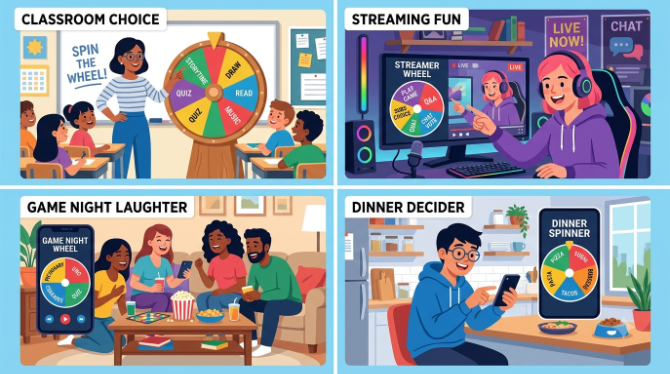
The reason this tool hasn't faded into a novelty is that so many unrelated groups of people find it genuinely useful. A few of the most common ones:
-
Teachers and tutorsCalling on students, forming project groups, deciding who presents next — without it ever looking like favoritism. See our classroom activities guide.
-
Contest and giveaway hostsPicking a winner live, where entrants can watch it happen instead of just trusting a claim. Full walkthrough in our giveaway guide.
-
Party and game-night hostsDeciding turn order, dares, or team splits without anyone arguing about it.
-
StreamersBuilt into challenge segments, viewer-submitted games, and subscriber draws. See how streamers use it.
-
Anyone with a small everyday decisionWhat's for dinner, which movie, whose turn to do the dishes — type it in and let it decide.
-
Teams at workAssigning tasks, ordering standups, choosing a note-taker — see our team-building guide.
5. Features Worth Prioritizing
Wheel tools aren't all built to the same standard. A few things reliably separate a genuinely useful one from a frustrating one:
- No entry cap — you shouldn't hit a paywall for adding a 26th name.
- Remove-after-spin toggle — automatically drops the winner so they're out of the running for the next draw.
- Editable colors and themes — useful for matching a classroom, brand, or stream layout.
- Weighted entries — duplicate an option to give it better odds.
- A mute button — the ticking sound isn't always appropriate for a quiet office or classroom.
- Shareable saved wheels — a link that reloads your exact setup without retyping anything.
- Fullscreen view — for projectors or a stream overlay.
- Solid mobile support — plenty of use cases start on a phone, not a desktop.
spinthewheelsonline.com covers every item on that list without an account or payment wall, and it runs smoothly across current desktop and mobile browsers.
6. Wheel Spinner vs. Other Random Pickers
A wheel isn't the only way to generate a random result online — here is how it stacks up against the usual alternatives.
| Method | Engaging to Watch | Custom Entries | Good for Groups | Best Fit |
|---|---|---|---|---|
| 🎡 Spin Wheel | ✔ Yes | ✔ Yes | ✔ Yes | Classrooms, giveaways, group decisions |
| 🎲 Dice Roller | Somewhat | ✘ No | ✘ No | Tabletop games |
| 🪙 Coin Flip | ✘ No | ✘ No | ✘ No | Two-option calls only |
| 🔢 Random Number Tool | ✘ No | Limited | ✘ No | Lottery-style draws |
| 📋 Simple Name List Picker | ✘ No | ✔ Yes | Somewhat | Fast, no-frills draws |
For anything happening in front of a group — a classroom, a stream, a public giveaway — the wheel format wins mainly because the process itself is visible. More detail in our comparison of random picker tools.
7. Advice From Frequent Users
- Teachers: Load the full class roster once at the start of the term and bookmark the wheel. Turn on remove-after-spin so everyone gets a turn before names repeat.
- Live giveaway hosts: Share your screen while spinning so entrants see it happen in real time, and keep remove-after-spin on to avoid picking the same winner twice. More detail in our giveaway winner guide.
- Game night: Pre-build a few themed wheels — dares, challenges, categories — and save each as its own link so you're not retyping lists mid-game.
- Streamers: A longer spin time and fullscreen mode tend to hold viewer attention better than a quick, small spin.
- Personal decisions: Pay attention to your gut reaction the second it lands — a flicker of disappointment usually tells you what you actually wanted before the wheel spoke.
- Offices: Weighted entries make for a transparent way to reward extra effort in an internal prize draw, since everyone can see why certain names got more slices.
🎡 Spin One Yourself
No account needed — add your list and spin in under a minute, on any device.
Open Spin the Wheel — Free →8. Frequently Asked Questions
9. Final Thoughts
A spin wheel generator solves a small but recurring annoyance: making a choice that's actually fair, and that everyone involved can see is fair, without turning it into a group debate. Underneath the animation, it's nothing more exotic than a browser's random number generator — but wrapping that in a visible, shared spin is exactly what makes it work so well in classrooms, on streams, in offices, and around the dinner table.
It costs nothing, takes about as long to set up as it does to type a list, and works the second you load the page. Next time something needs deciding, try it at spinthewheelsonline.com.
- A spin wheel generator is a free, browser-based random picker built around a visible spinning animation.
- It relies on a standard random number generator, making it statistically fair on every spin.
- Teachers, streamers, event hosts, and everyday users all rely on it for different reasons.
- No account or install is required — it works instantly on any device.
- Options like remove-after-spin and weighted entries make it adaptable to nearly any situation.