- Why the Process Matters as Much as the Prize
- What to Have Ready Before You Draw
- The Full Draw Process, Step by Step
- Collecting Entries by Platform
- Weighted Entries — When and How
- Live vs. Recorded — Which Builds More Trust?
- Seven Mistakes That Undermine a Draw
- Announcing the Winner the Right Way
- Frequently Asked Questions
- Final Thoughts
Running a giveaway is easy right up until the moment you have to actually choose a winner. That's when the doubts creep in — is this fair, will people believe it, what happens if the same person seems to win everything you run? These aren't small worries. How a winner is chosen shapes whether people trust your next giveaway too.
A poorly handled draw doesn't just disappoint the people who entered — it invites accusations in the comments, and those accusations tend to stick even when they're wrong. Audiences in 2026 are quick to question anything that looks staged, so the visible fairness of your process matters as much as the prize itself.
This guide walks through the entire process end to end, using a free online spin the wheel tool as the mechanism. New to the idea? Our complete guide to what a spin the wheel tool is and how it works is a good place to start first.
This guide focuses on running a fair, transparent draw with a free tool — it isn't legal advice. Prize competition rules vary by country, so check your local regulations before running any paid-entry or commercial giveaway.
1. Why the Process Matters as Much as the Prize
Most hosts spend their energy on the prize and barely think about the draw itself. But audiences notice the draw far more than you'd expect, and "this was rigged" is one of the fastest-spreading comments on social media — accurate or not.
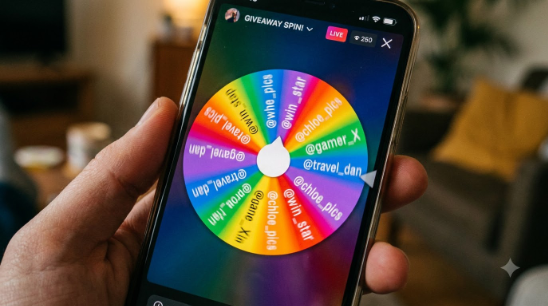
A visible, public random draw solves this from two directions at once: it proves the outcome wasn't chosen by hand, and it turns an administrative task into something people actually want to watch. That's really the whole case for using a spin wheel over a private list picker — it makes the fairness observable.
There's a simple reason a spin holds attention the way a name on a screenshot never will: watching something slow down and land creates real, shared suspense — even for people who didn't enter. Our piece on the psychology behind random decision making goes deeper into why that visual moment lands so much harder than a typed announcement.
2. What to Have Ready Before You Draw
Before you spin anything, get these in place:
- A clean, complete entry list. Everyone who met your stated conditions should be on it, and no one else. Duplicates need a deliberate decision (see weighted entries below), not an accident.
- Entry rules that were public from the start. If you said "one entry per person," check for duplicates before the draw — removing people afterwards, even correctly, looks suspicious.
- A screen recorder ready, if you're drawing live. Your phone's built-in recorder is more than enough.
- The wheel already loaded with entries. Set it up beforehand and test a spin privately. Don't fumble through setup in front of a live audience.
- A plan for an unreachable winner. Decide — and state publicly — how long you'll wait before redrawing. This protects you and sets expectations for everyone watching.
For Instagram, collect comments manually or use a comment export tool. For email lists, export directly from your platform. For YouTube, comment exports work well too. Deduplicate before adding to the wheel unless weighted entries are part of your rules.
3. The Full Draw Process, Step by Step
Here's the process from raw entries to a public announcement:
-
Build and clean your entry list
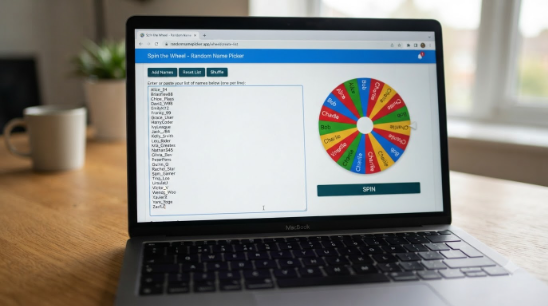
Export everything into a plain list, one entry per line. Remove accidental duplicates if your rules call for one entry per person. If some entrants earned bonus entries, add their name that many times now, and keep a backup copy of the list.
-
Open the spin wheel tool
Go to spinthewheelsonline.com — no login, no download, works instantly in any browser.
-
Paste your list into the wheel
Paste your full list into the entries panel. A slice is created automatically for every entry, with no practical limit on how many you can add.
-
Go fullscreen
Fullscreen makes the whole process clearly visible if you're streaming or recording — a bigger wheel simply reads better on camera.
-
Start recording or go live
Begin your recording or livestream. Show the full, loaded entry list before you spin — this one habit does more for trust than almost anything else on this list.
-
Spin
Click spin and let it run without interference. The natural slowdown builds its own suspense — there's no need to narrate over it.
-
Capture the result
Record or screenshot the final landing name clearly. Read it out, show it on screen, and give it a beat before moving on.
-
Contact privately, then announce publicly
Message the winner first, then post publicly and tag them. Include the spin recording as proof. See how to announce the winner properly below for exact wording.
4. Collecting Entries by Platform
The draw itself is identical everywhere — what changes is how you gather entries in the first place.
Export commenters manually or via a scraper tool. Add "tag a friend" bonus names separately.
YouTube
Pull comments through YouTube Studio or a third-party export tool. Cross-check manually for subscriber-only draws.
Twitch
Collect chat-command entries, export, paste into the wheel, and spin live on stream. See how streamers use spin the wheel.
X (Twitter)
Collect retweets or reply usernames manually. Keeping entries under a few hundred makes clean-up manageable.
Email List
Export names or addresses from your provider and paste directly. Email audiences tend to be the most engaged.
Schools & Events
Same process for raffles and event draws. See our guide to running a school raffle with a spin wheel.
5. Weighted Entries — When and How
A standard giveaway gives every entrant one equal shot. But if your rules reward extra actions — following, tagging two friends, sharing to a story — that's where weighted entries come in.
The mechanic is simple: if someone earned three entries, add their name to the wheel three times. Their slice grows, and their odds rise proportionally. No special setting needed — just repeat the name.
Standard Entry (1×)
Following, liking, or commenting. One name, added once.
Bonus Entry (2×)
Tagging one friend or sharing to a story. Add the name twice.
Triple Entry (3×)
Tagging two friends, sharing, and following. Name appears three times.
Loyalty Entry (5×+)
Long-term subscribers or repeat supporters — a meaningful bonus for your most engaged community.
Announce your weighted entry system publicly before the draw opens, never after. Seeing a name appear several times on a visible wheel reads as fair; discovering it after the fact reads as suspicious. Say it upfront, every time.
For the mechanics behind why this method holds up statistically, see whether a digital spin wheel is truly random — useful if a sceptical commenter ever asks you to explain it.
6. Live vs. Recorded — Which Builds More Trust?
You can run your spin live or record it and share the footage afterward. Both are legitimate — they just suit different situations.
| Factor | 🔴 Live Draw | 📹 Recorded Draw |
|---|---|---|
| Trust level | ✔ Very high — real-time audience | Solid, but editing is theoretically possible |
| Engagement | ✔ Highest — live reactions and comments | Lower — passive viewing |
| Reach | ✔ Most platforms favour live content | Good — still shareable as a clip |
| Ease | Needs preparation — no do-overs | ✔ Can redo the take if something breaks |
| Best for | Established accounts, brands, events | Smaller accounts, first-timers, schools |
For anything over a couple hundred entrants, going live is worth the extra preparation. If live feels like too much, a screen-recorded spin — fullscreen, clearly narrated, posted unedited — is a strong second choice. What to avoid is posting just a screenshot with no video; that's the format audiences trust least.
Streamers in particular get a lot of mileage out of this moment. Our piece on how streamers use spin the wheel for challenges and giveaways has real examples of creators turning a short spin into their most shared clip of the week.
7. Seven Mistakes That Undermine a Draw
Some of these are obvious, some are subtle — all of them chip away at how credible a draw looks. Avoid each one.
- Telling the winner privately before posting publicly. If the winner already knew, people assume they were tipped off early. Announce publicly first, or at the same time.
- Not showing the entry list before spinning. Without seeing the loaded list, there's no way for anyone to verify the draw was complete and fair.
- Deleting "rigged" comments. This confirms exactly what people were worried about. Leave the comments up and reply calmly with your proof instead.
- Relying on a screenshot as your only proof. Screenshots can be edited. A recorded video showing the full spin — entries, wheel, landing name — is much stronger evidence.
- Changing the rules partway through. If entries opened under one set of rules, they can't change on day three. Lock the rules before entries open.
- Picking a winner who didn't meet the requirements. If following was required and the winner doesn't follow you, people will notice fast. Check eligibility before announcing.
- Never confirming the prize was sent. A draw with no follow-up leaves people wondering whether the prize ever arrived. A short "prize delivered" post closes the loop.
Keep your spin recording saved and link to it in your winner announcement. Anyone who missed the live draw can then verify it themselves at any time — a one-off moment becomes lasting proof.
8. Announcing the Winner the Right Way
Your announcement post carries as much weight as the draw itself. It should include:
- The winner's handle, tagged clearly — no ambiguity about who won.
- Your spin video or screenshot as proof.
- The prize, stated plainly — a reminder avoids later confusion.
- Your response deadline — something like "48 hours to claim, or a new winner will be drawn." Post it publicly so a redraw can't be disputed later.
- A thank-you to everyone who entered. Easy to skip, genuinely worth including — it keeps goodwill with the people who didn't win.
- A mention of your next giveaway, if you're planning one. "Follow so you don't miss the next one" is a small line that does a lot of work.
"🎉 The winner has been chosen! After a fully random spin with all entries loaded, congratulations to @[username] — you've won [prize]. Please reach out within 48 hours to claim it. Thank you to everyone who entered — another giveaway is coming soon. Full draw here: [link to spin video]."
🎁 Ready to Run Your Draw?
Open the free spin wheel, paste your entry list, and spin. Under 60 seconds, no sign-up, works on any device.
Open Spin the Wheel — Free →9. Frequently Asked Questions
10. Final Thoughts
A fair, credible giveaway doesn't need special software or technical skill. It needs one thing: a visible process your audience can actually check.
A spin wheel gives you exactly that — the animation makes randomness tangible, the visible entry list proves nothing was left out, and the recorded result becomes permanent proof. The shared moment of watching it slow down, whether on a livestream or in a classroom, is something a static result screen simply can't match.
Whether you're picking one winner from fifty comments or running a multi-winner draw from thousands of subscribers, the steps stay the same: collect entries, load the wheel, show the list, spin visibly, record the result, announce with proof. Do that consistently and your credibility stays intact.
The tool is free, works on any device, and needs no account. Visit spinthewheelsonline.com and your draw is ready in under a minute.
- Show your full entry list loaded into the wheel before spinning — it's the single biggest trust builder.
- Record or go live every time. A video is proof; a screenshot is just an image.
- Publish your rules, weighted entry system, and non-response policy before the draw opens.
- Don't delete "rigged" comments — respond calmly with your spin video instead.
- Use weighted entries for bonus actions, but always announce them upfront.
- Close the loop publicly once the prize is delivered.
- See our full comparison of random picker tools for why visible draws build more trust than private ones.