
A spin wheel works best when you already have a shortlist of options you would happily accept and only need to commit. The ten setups below apply that idea to writing, workouts, spending, meals and travel, journaling, studying, chores, brainstorming, content planning and task lists. Build any of them in under a minute with the free spin wheel.
Table of contents
- What a wheel actually does for you
- How to build a wheel worth spinning
- 01 · Breaking a writing block
- 02 · Keeping workouts from going stale
- 03 · Closing out discretionary spending
- 04 · Ending the "where should we eat" loop
- 05 · Getting past the blank journal page
- 06 · Turning flashcard review into a drill
- 07 · Splitting chores without arguing
- 08 · Unsticking a brainstorm
- 09 · Filling a content calendar
- 10 · Working a task list
- Quick-reference table
- When a wheel is the wrong tool
- The familiar uses, done better
- Frequently asked questions
What a Wheel Actually Does For You
A spin wheel does not come up with your options. That part is still yours. What it removes is the last and most draining step of a decision: choosing one item from a list of things you would already be fine with. That final step is where people tend to stall, re-compare and second-guess, even though nothing much is at stake.
Seen that way, the use cases go far beyond giveaways and picking names in class. Anywhere you have a shortlist and a reluctance to commit, a wheel ends the stalling. If you are new to the tool itself, start with our explainer on what a spin the wheel tool is and how it works, then come back here for the practical setups. If you want to know why handing small choices to chance feels so relieving, we cover that in the psychology behind random decision making.
How to Build a Wheel Worth Spinning
Every setup below follows the same five rules. They are the difference between a wheel you use for months and one you abandon after a single spin.
- Filter first, spin second. Only add options you would genuinely accept. A wheel full of things you do not want simply stacks a coin flip on top of an unmade decision.
- Keep it short. Four to twelve entries is the practical range for everyday choices. Longer lists make each entry feel arbitrary and invite you to skip the result.
- Decide the rule before the spin. Agree that the result is binding, or agree in advance that you get one re-spin. Negotiating afterwards defeats the point.
- Use several small wheels, not one big one. A "type" wheel plus a "duration" wheel gives more variety, and more honest results, than one tangled list.
- Save it as a link. Each wheel you build has its own shareable link, so a wheel you use weekly is one bookmark away instead of being rebuilt every time.
Read your entries aloud and imagine each one coming up. If any result would make you say "not that one," delete it now. That reaction is your real preference showing, and the wheel cannot fix it for you.
✍️ Breaking a Writing Block
A constraint moves you forward faster than a blank page
Writer's block is rarely a shortage of ideas. It is usually too many half-formed ideas and no obvious way to rank them. A wheel skips the ranking. You spin, you get a starting point, and the choosing is over before it can slow you down.
Instead of one long list, build three small wheels: a setting wheel, a character-flaw wheel and a conflict wheel. Spin all three and combine what lands. The pairings you would never have chosen on purpose tend to be the most interesting, because you cannot fall back on your usual instincts. For character names, pair the exercise with our random name generator.
💪 Keeping a Workout Routine From Going Stale
Take the "what am I even doing today" decision off the table
A fixed weekly split is easy to follow for a month and easy to quietly drop after that, usually once you can predict Wednesday's session before it happens. Predictability is efficient, but it is also where motivation leaks out.
Set up two wheels, one for workout type and one for duration, and spin both before you change clothes. Deciding in advance removes the chance to talk yourself out of it after seeing the result. Treat "rest" as a normal entry: if the wheel picked it, it counts. You can also let the sport picker wheel choose a sport for the weekend, or use the day picker wheel to decide which day gets your hardest session. For a wider weekly system, see how to plan a week of meals, workouts and tasks with a wheel.

💰 Closing Out Discretionary Spending
The budget is done; the wheel just closes the loop
This one is for a narrow situation: you have already set a spending cap and shortlisted several things that all fit inside it, yet you keep circling back to compare them instead of buying anything. The hesitation is no longer about money. It is about not wanting to feel you picked the "wrong" option.
Because every entry already fits your budget, there is no wrong outcome. Load the options, fix the cap once, spin, and stop revisiting the decision. This only works if the shortlist is honest. Never add something you cannot comfortably afford just to see what happens. When you are down to exactly two equal options, the coin flip wheel does the same job faster.
🍽️ Ending the "Where Should We Eat" Loop
Cut the exchange off before it starts
You know the exchange: "Where do you want to eat?" "I don't mind, you pick." Ten minutes pass and nothing is decided. A shared wheel, saved as a link both people can open, cuts it short because the result is agreed to be binding before anyone spins. The food picker wheel gives you a ready-made set of cuisines, and our guide on deciding what to eat tonight with a wheel shows how to tailor it to your usual haunts.
The same method scales to bigger choices. Shortlist destinations that are genuinely within budget and time, then let the country picker wheel or your own list decide. For an evening out, couples can combine a dinner wheel with a film wheel; see our date night roulette ideas and the movie genre wheel.
🧘 Getting Past the Blank Page in Journaling
A specific prompt beats an open one
"Write about your day" is hard to start from because it does not point anywhere. A specific, slightly unexpected prompt does. Part of the reason is that it is specific, and part is that you did not choose it, so there is nothing to perform for.
Load a wheel with reflective prompts and spin before you start writing, not after ten minutes of stalling. Set a timer for five to ten minutes and write only about what landed. Refresh the list every month so the prompts do not become predictable.
📚 Turning Flashcard Review Into a Real Drill
Unpredictable order beats a deck whose sequence you have memorized
Flashcard apps work well until you start recognizing the order of the deck instead of genuinely recalling each answer. A wheel has no order to memorize, which keeps recall honest. This builds on what learning researchers call the testing effect: actively retrieving an answer strengthens memory more than rereading it.
Load vocabulary, verb forms or formulas, set a hard limit of about five seconds per answer, and only remove an entry when you got it right without hesitating. Anything left after a few passes is exactly what needs more study. Language learners can pair this with the language picker wheel to choose what to practice, and our guides on student study and revision setups and language learning with a wheel go deeper.
🏠 Splitting Chores Without Arguing
One spin beats the same negotiation every Sunday
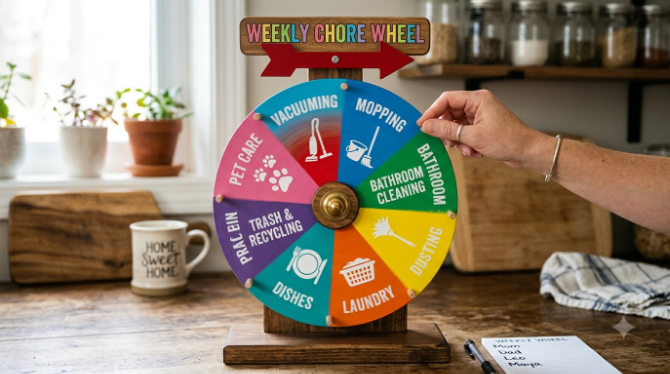
Most chore disagreements are not really about the chore. They are about who decided the assignment and whether it felt fair. A shared wheel removes the "who decided" question because nobody did; it landed where it landed.
Put each of the week's tasks on the wheel, spin once per person, and treat the result as final. Over many weeks chance tends to even things out, though a single week can feel lopsided. If one person keeps drawing the task everyone dislikes, add a simple rule such as "nobody gets the same chore twice in a row." For splitting a group into fair sides, the team picker wheel handles it in one spin.
🔬 Unsticking a Brainstorm With a Forced Constraint
An unrelated input beats a comfortable one
Random stimulation is an established creativity technique, often associated with Edward de Bono's work on lateral thinking: bring in a concept unrelated to the problem, then force a connection. It works because stuck brainstorms tend to circle the same few familiar directions, and an unrelated word breaks that pattern in a way "just think differently" never does.
A wheel is the simplest way to pick that word on demand. Load it with plain nouns, spin whenever the room goes quiet, and give the group a fixed five minutes to link the word to the problem. For visual projects, the color picker wheel can supply a palette constraint. Teams can find more formats in our guides to team building with a wheel and icebreakers and onboarding.
📱 Filling a Content Calendar in One Sitting
Two short spins beat an hour of staring at an empty grid
If you post regularly, the hard part is rarely having topics. It is deciding, fresh every day, which topic and which format to use. That daily re-deciding is what drains people.
Do the deciding once a week. Build a format wheel and a topic wheel for your niche, spin both several times in one sitting, and fill the week's calendar with the pairings. You are still choosing what to post, just once instead of daily. Creators who go live can also give viewers a wheel to spin on stream; see how streamers use spin wheels.
⚡ Working a Task List Without Re-Ranking It
Stop reorganizing the list and start working it
A lot of procrastination is not avoiding work. It is avoiding the decision about which piece of work to start with, especially when everything feels equally urgent. Reordering a to-do list can feel productive while achieving nothing.
Add the day's tasks to a wheel and spin at the start of each focus block. Work on whatever lands for a set stretch, with 25 minutes being the common Pomodoro length, then spin again. It will not always give the "optimal" order, but it reliably beats the time lost deciding what optimal means. Genuinely urgent items (a deadline today) should be done first and kept off the wheel. For smaller "now or later" calls during the day, use the Yes or No wheel, and read when a Yes or No wheel is the right tool.
In every setup, the thinking happened before the spin: the shortlist, the budget, the acceptable options. The wheel does not decide for you. It ends the loop of re-deciding something you had already settled. That is the real value of a random wheel: not luck, but a clean way to commit.
Quick-Reference: All Ten Setups at a Glance
| Use | Wheels needed | Entries | Best time to spin |
|---|---|---|---|
| Writing block | 3 (setting, flaw, conflict) | 5–8 each | Start of a writing session |
| Workouts | 2 (type, duration) | 3–6 each | Before changing clothes |
| Spending | 1 | 3–5 | Once, after setting the cap |
| Meals & travel | 1 per decision | 4–8 | When the question first comes up |
| Journaling | 1 | 8–12 | Before you start writing |
| Study drills | 1 | 15–30 | Each review session |
| Chores | 1 (rebuilt weekly) | One per task | Start of the week |
| Brainstorming | 1 | 10–20 nouns | When the room goes quiet |
| Content calendar | 2 (format, topic) | 5–8 each | Once a week |
| Task list | 1 | 6–10 | Start of each focus block |
When a Wheel Is the Wrong Tool
A wheel is a convenience for low-stakes choices among acceptable options, and it is worth being honest about where it does not belong.
- High-stakes decisions. Medical, legal, financial and career choices need information and judgment, not chance.
- Options that are not equally acceptable. If one entry is clearly better, pick it. A wheel only helps when you are genuinely indifferent.
- Safety and fairness checks. Where a result affects other people's opportunities, such as prizes or grades, decide the rules openly first. Our guides on running an online giveaway and school raffles cover transparent setups.
Curious about the alternatives? We compare them in spin the wheel vs. other random pickers, and explain how the result is generated in is a digital spin wheel truly random.
The Familiar Uses, Done a Bit Better
Giveaways, classrooms and game nights are the obvious uses because they work. Most people still get less from them than they could, so here are the upgrades worth knowing.
🏫 Classrooms
Go beyond picking names: group formation, topic assignment and exit-ticket questions. See the teacher's guide and classroom examples.
🎁 Giveaways
A visible draw builds more audience trust than a hidden picker. Walkthrough in our giveaway winner guide.
🎉 Parties & Game Nights
Setups for family game nights, birthday parties and the truth or dare wheel.
💼 Work & Teams
Recognition, task assignment and meetings: see HR and office event ideas and name picking for work and school.
Frequently Asked Questions
What is a spin wheel actually good for besides giveaways?
How many entries should I put on a wheel?
Can I keep separate wheels for different uses?
How is a spin wheel different from a Yes or No wheel?
Should I follow the result if I don't like it?
Do I need an account to use these setups?
- A wheel is useful anywhere you have a pre-approved shortlist and need to stop stalling.
- Filter your options honestly first. The wheel removes the last step, not the thinking.
- Use several small wheels with 4 to 12 entries instead of one big list.
- Save each setup as a link so it is ready in seconds, and skip the wheel for high-stakes choices.