You ask a question. Thirty hands could theoretically go up, but only four ever actually do — and they're the same four every time. Call on someone else and the room goes tense; call on the usual four and the rest of the class has quietly checked out.
It's one of teaching's oldest, most stubborn problems. And a free spin the wheel tool turns out to be one of the simplest fixes available. It sounds almost too small to matter, but teachers who try it tend to keep using it — the shift in classroom energy is noticeable within days.
If you've never used one before, our guide to what a spin the wheel tool is and how it works covers the basics in a few minutes. In short: it's a free, browser-based randomiser — load it with names or options, and it picks one with a spin. No app, no account, no cost.
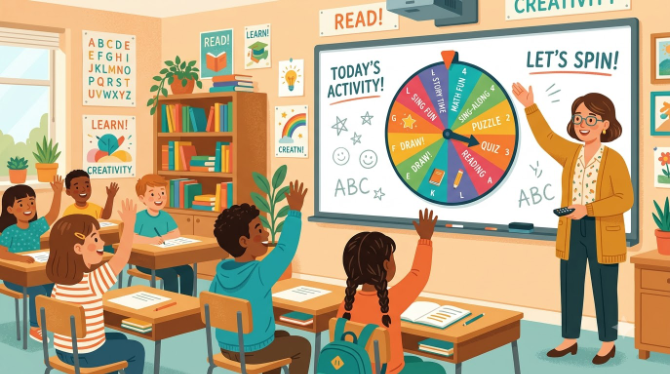
A spin wheel takes the "who do I call on" decision out of the teacher's hands entirely — which makes the classroom feel fairer, more exciting, and genuinely more fun for everyone in the room.
1. Why a Spinning Wheel Works So Well in a Classroom
There's a reason spinning things have always held children's attention — tops, roundabouts, fidget spinners. Watching something spin and slow down, not knowing exactly where it'll land, is quietly compelling in a way that's hard to manufacture with most other classroom tools.
It's not just novelty, though. When students know that any of them could be picked at any moment, purely at random, their attention shifts. They stay a bit more alert. They start half-preparing answers even when they're not sure they'll be asked. That move from passive listener to quietly-ready participant is something a lot of teachers notice within the first week or two of using a wheel regularly.
There's also a fairness element worth naming. Students — particularly older ones — notice exactly who gets called on most. A visible, transparent random picker removes any suspicion of favouritism from the equation entirely. The wheel picked, not the teacher. That small shift in perception does real work for classroom trust.
If you're curious about the reasoning behind why random selection works so well psychologically, our piece on the psychology behind random decision making goes into more depth — worth a read for anyone interested in the "why" behind the tool.
2. Getting Started in Under Two Minutes
This is genuinely one of the fastest tools you'll ever add to your teaching routine. Here's the whole process:
-
Open the tool on any device
Visit spinthewheelsonline.com on a laptop, tablet, or interactive whiteboard. No download or login — it loads instantly in any browser.
-
Add your class list
Type or paste student names into the entry panel. There's no meaningful cap — a full class of thirty-plus works exactly as well as a small group.
-
Save the wheel for reuse
Once your class list is loaded, bookmark the link so you don't have to retype names every lesson. Set it up once, use it all term.
-
Project it for the whole room
Connect to your classroom projector or interactive whiteboard. Fullscreen mode makes it large, clear, and impossible to miss from the back row.
-
Spin, remove, repeat
Turn on "remove after spin" so each student is picked only once per round — guaranteeing everyone participates before anyone goes twice, automatically.
Keep a separate saved wheel for each class you teach. Three groups, three bookmarked links, each pre-loaded — switching between them takes seconds between lessons.
3. Ten Classroom Uses Teachers Rely On
A spin wheel isn't just for picking names — that's really only the starting point. Here are ten ways teachers are actually using one right now:
Random Question Time
Ask the question first, give the class 30 seconds to think, then spin. Participation rises almost immediately because everyone's had a moment to prepare.
Group Generator
Add student names and spin repeatedly to build random groups. Students accept random groupings far more readily than teacher-assigned ones.
Topic Selector
Load essay topics or project themes onto the wheel. Whatever it lands on is the brief — no more debating who got the "better" topic.
Class Job Rotation
Add classroom roles — board cleaner, register collector, line leader — and spin weekly. No favourites, fully transparent.
Vocabulary Revision
Add words to the wheel. Whoever it lands on defines it, uses it in a sentence, or translates it — quick, low-pressure, high engagement.
Presentation Order
Spin to set the order for student presentations. Nobody can complain about going first — the wheel decided, not you.
Homework Review Roulette
Put homework questions on the wheel. Since any question could come up, reviewing all of it suddenly feels worthwhile to students.
Exit Ticket Selector
Spin at the end of a lesson to pick who shares their takeaway. A calm, focused way to close a session.
Reward Wheel
Load small rewards — free time, pick the next song, skip a quiz question — and use it as a class motivator tied to achievement.
Prize Draw / Raffle
Use it as a class raffle for end-of-term prizes. For a fuller walkthrough, see our guide on running a school raffle with a free spin wheel.
Build a "challenge wheel" for early finishers, loaded with extension tasks — "write three more examples," "sketch a diagram," "explain this to a partner." Fast workers spin for their next task instead of sitting idle.
4. Ideas Sorted by Subject
The tool's flexibility means it genuinely fits every subject area. A few subject-specific starting points:
English: Load writing prompts, story genres, or character types. Students spin to get their creative brief, which removes the "I don't know what to write about" stall entirely.
Maths: Load number concepts or problem types. A student spins, lands on "fractions," and answers or demonstrates on the spot. Fast-paced and useful for keeping revision energy up.
Languages (MFL): Load target-language vocabulary. Students spin and translate, use it in a sentence, or conjugate a related verb — good for oral practice without the awkwardness of having to volunteer.
Science: Load concepts, variables, or hypothesis statements. Groups spin for their investigation focus — takes the tedium out of topic selection.
History/Geography: Load key dates, events, countries, or figures. Spin to decide which topic a student summarises from memory — a low-stakes warm-up that works well before a test.
Keep a "wildcard" wheel stocked with quick activities from multiple subjects — ideal for form time, cover lessons, or the last ten minutes of a Friday afternoon when energy is low and you need something engaging fast.
5. Habits That Make It Work Every Time
A spin wheel only performs as well as the habits built around it. A few practices separate teachers who get lasting results from those who try it once and drop it:
- Ask before you spin. Put the question to the class first, give everyone 20–30 seconds to think, then spin. Even hesitant students get a moment to prepare, so whoever's picked is far more likely to answer confidently.
- Use "remove after spin" as a default. In any session where you want full-class participation, keep it on. It stops the same student being picked twice before everyone else has had a turn.
- Make the spin visible. Project it every time. The visual is half the value — a shared moment of tension as the wheel slows down is something a plain name list simply can't replicate.
- Introduce it early in the term. Bring it in during the first week so it becomes a familiar part of your routine. Students who grow used to it from day one respond far better than those who meet it mid-year as a surprise.
- Don't overuse it. Three or four spins per lesson is plenty. Reaching for it on every single decision dilutes the excitement — save it for moments where the drama actually adds something.
- Pair it with genuine praise. When the wheel picks someone and they answer well, say so. "That's a great answer — and you had no idea you'd be picked!" builds confidence and turns the next spin into something students look forward to rather than dread.
6. Common Mistakes — And How to Sidestep Them
Most teachers see results almost immediately. A handful of common missteps, though, can quietly blunt the effect:
Spinning without warning
Springing a spin with no prep time causes anxiety, not engagement. Ask the question first, then spin.
Dropping it after two weeks
It only becomes a lasting habit if you use it consistently. Build it into your lesson structure so it's routine, not a novelty.
Only using it for names
Names are just the start. Teachers who get the most from it also use it for topics, tasks, rewards, and grouping.
Not saving the wheel
Retyping your class list every lesson defeats the point. Save the link once and it's one click away every time.
7. Beyond the Classroom
Once you've used a spin wheel in your own lessons, it's easy to spot how the same idea applies elsewhere in school life — and beyond it. A few related reads worth a look:
- Staff meetings and INSET days: The same random-selection logic that works in a classroom works just as well in a staff room. Our guide on using a spin wheel for team building at work is popular with department heads and senior leadership.
- Running fairs and prize draws: School fêtes, charity raffles, and end-of-term prizes all benefit from a transparent public spin. See our guide to picking a fair random winner for giveaways.
- At home too: If you're after something for family use, our spin the wheel ideas for birthday parties and baby showers has plenty of easy activities for every age.
- Unexpected uses: Our roundup of 10 best uses of a random wheel spinner is a popular read among teachers looking to expand beyond the obvious.
- Explaining why it's different: If a colleague or parent ever asks why a wheel beats a plain random-name generator, our comparison of spin the wheel vs. other random pickers lays it out clearly.
🎡 Set Up Your Classroom Wheel Right Now
Free, works on any device, no account needed. Add your class list and you're ready to spin in under 60 seconds.
Open Spin the Wheel — Free →8. Frequently Asked Questions
9. Final Thoughts
Teaching is demanding enough without adding a tool that needs training, a subscription, or a complicated setup. A spin wheel is the opposite of that — one of the few genuinely free classroom tools that noticeably changes lesson energy for almost no setup cost at all.
What makes it work isn't just the randomness — it's the shared, visible experience of watching it spin. When the whole class watches that wheel slow down together, everyone's attention is on the same thing at the same time. That kind of collective focus is genuinely hard to manufacture, and it's sitting there, free, in a browser tab.
Whether you teach five-year-olds or seventeen-year-olds, in a busy city classroom or a small rural school, a spin wheel tends to quietly earn a permanent spot in a teacher's toolkit. Most who try it don't go back.
Ready to try it? Visit spinthewheelsonline.com, add your class list, and spin — your students will notice the difference before the lesson's over.
- A spin wheel raises participation by making selection feel fair, visible, and genuinely exciting.
- Setup takes under two minutes — save your class list once and reuse it all term.
- Works for names, topics, tasks, rewards, and grouping — not just calling on students.
- "Remove after spin" ensures equal participation before anyone repeats.
- Project it for the whole room — the shared moment is where the value comes from.
- Free, with no account or download, at spinthewheelsonline.com.