- Why a Wheel Works Well in a Classroom
- Setting Up a Classroom Wheel in Under Two Minutes
- Five Core Classroom Uses, With Examples
- Subject-Specific Activity Ideas
- What Works Best by Grade Level
- Why the Engagement Lift Holds Up
- Lessons From Teachers Already Using It
- Frequently Asked Questions
- Conclusion
Every teacher recognises the moment: you ask a question, and the same two or three hands go up while everyone else studies the floor. Or you need to split the class into groups and within seconds someone's arguing the split isn't fair. Or you hand out presentation topics and half the room is convinced they got the hard one.
A free online spin wheel won't fix every classroom challenge, but it quietly removes a surprising number of them. It takes under two minutes to set up, costs nothing, runs on whatever device is in the room, and the moment it's projected onto the board, something useful happens — the class actually pays attention.
This guide covers not just what a spin wheel does, but how to use it deliberately — with subject-tested activities across grade levels, a plain explanation of why the engagement effect holds up over time, and practical habits from teachers who use it weekly.
Start with our plain-language overview: What Is a Spin the Wheel Tool and How Does It Work? It covers the setup and the randomness mechanism in a few minutes.
1. Why a Wheel Works Well in a Classroom
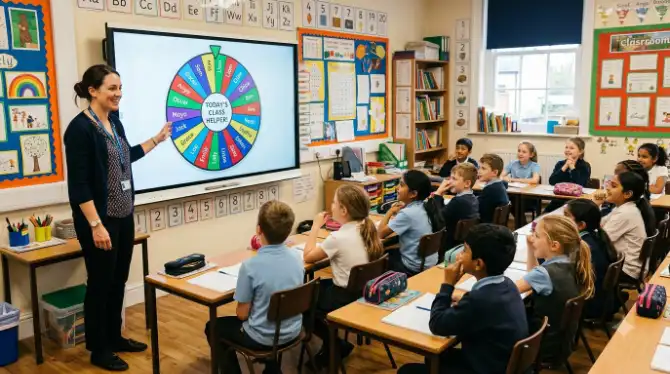
Something specific happens when a spinning wheel appears on a classroom screen: students go quiet and watch. Not because they've been told to — because the result is genuinely uncertain and could land on them. That shared moment of not-knowing does more for attention than most classroom management tricks manage on their own.
Beyond the moment itself, there's a quieter benefit: perceived fairness. When a neutral tool makes the selection instead of the teacher, it removes a layer of social friction that can quietly wear on classroom culture — nobody feels singled out, and nobody suspects favouritism. The wheel doesn't know who's confident, who's quiet, or who answered last time. Students of every age respond well to that neutrality.
There's a psychological dimension worth understanding too. Our article on the psychology behind random decision making explains why uncertainty catches attention in a way predictable patterns of teacher selection simply don't. In short: genuine uncertainty triggers real engagement, and engagement is what makes the rest of the lesson land.
The same fairness-through-randomness idea shows up elsewhere too — remote teams use it for meeting decisions, families use it for game night, and streamers use it for live challenges — but classrooms are where the fairness effect tends to matter most consistently.
2. Setting Up a Classroom Wheel in Under Two Minutes
You don't need a training session for this. Here's the fastest path from nothing to a ready-to-project wheel:
-
Open the tool on your classroom device
Go to spinthewheelsonline.com on any laptop, tablet, or phone — no installation or account, works instantly in any browser.
-
Add your class list
Type or paste every student's name into the entry panel. If you already have a digital register, paste the full list at once — a class of thirty takes under a minute.
-
Save the wheel as a bookmark
Bookmark the shareable URL. Reload it at the start of any lesson and the class list is already there — one setup, usable all year.
-
Connect to your projector or whiteboard
Go fullscreen within the tool for the clearest display. The whole class needs to see it well for the fairness effect to land properly.
-
Decide on sound before your first spin
The ticking sound as the wheel slows adds genuine suspense — students tend to like it. Turn it off in a shared space or if noise is a concern; the visual alone still works.
Build three wheels at the start of term: one with all student names, one with subject categories, and one with question or challenge types. Save each as its own bookmark, and you have three ready-to-use tools for the rest of the year with no further setup.
3. Five Core Classroom Uses, With Examples
Most teachers find a wheel covers five recurring classroom needs particularly well. Here's a worked example for each:
-
Random Selection for Answering Questions Load all student names, and spin instead of waiting for volunteers. Because anyone could be picked on any spin, every student has a reason to have an answer ready — the anticipation before the spin often does more for focus than the spin itself. Turn on "remove after spin" so everyone gets asked once before anyone repeats.
-
Group and Pair Formation Use the wheel to build pairs without the awkwardness of self-selection (same friendship groups every time) or teacher assignment (guaranteed complaints). Spin for one student, remove them, spin for their partner, and repeat. The process is visibly fair and hard to argue with.
-
Topic and Task Assignment For projects where different students need different topics, load them all onto the wheel and let each student spin for theirs. Nobody can claim they got the hard one on purpose — everyone went through the same process. Works well for homework extensions too.
-
Review Games and Quiz Categories Turn a vocabulary check or times-table drill into a game by putting categories on the wheel. Teams spin to pick their category before answering, keeping each round unpredictable — especially useful for end-of-unit revision when students need an engagement boost on content they've already seen.
-
Prize Draws and Classroom Rewards For merit rewards or end-of-term draws, the wheel gives a live, visible result students trust. See our full guide on running school raffles with a spin wheel for the details.

4. Subject-Specific Activity Ideas
The wheel earns its place by being genuinely useful across subjects rather than a one-trick tool. Here's a starting point, plus eight worked examples:
Story Starter Spin
Load 15–20 opening lines or scenarios. Spin to pick the class writing prompt — removes the "I don't know what to write about" delay that eats the first ten minutes of a session.
Times Tables Spin Drill
Put numbers 2–12 on the wheel and spin for the day's mental maths warm-up. Since students can't predict which table comes up, every number gets fair revision time.
Country Research Allocator
Load thirty country names and let each student spin for their research topic. The visible randomness heads off complaints about unfair allocation entirely.
Lab Role Rotation
Wheel entries: Lead Experimenter, Data Recorder, Equipment Manager, Observer, Safety Monitor. Spin before each practical so students rotate through every role across a term.
Vocabulary Challenge Wheel
Load 20–25 target words. Spin to select the word a student defines, translates, or uses in a sentence — works at any level.
Argument Perspective Allocator
Load historical viewpoints or stakeholder groups. Each student spins for the position they must argue, which tends to produce more nuanced writing than picking your own side.
Creative Constraint Spinner
Wheel entries: a colour limit, a medium, a time cap, a movement to reference. Constraints tend to produce more interesting work than an open brief.
End-of-Unit Review Spinner
Load every topic from the unit; teams spin and answer from whatever comes up. Ensures full coverage instead of students drifting toward what they already know.
5. What Works Best by Grade Level
Different age groups respond differently. Here's a quick reference to save you the trial and error:
| Grade / Stage | Best Wheel Formats | Key Benefit | Avoid |
|---|---|---|---|
| 🌱 Early Years / KS1 (4–7) | Name picker for activities, simple categories, PE role selector | ✔ Feels like a game; keeps waiting children engaged | Complex or text-heavy entries — keep it visual and simple |
| 📚 KS2 (7–11) | Times tables drill, story starters, group formation, quiz categories | ✔ Strong fairness instinct already present at this age | Too many entries — cap around 15 for projector readability |
| 📗 KS3 (11–14) | Topic allocators, debate perspective spinner, revision games, lab roles | ✔ Cuts through friendship-group defaults that peak at this age | Formats that feel childish — frame it as a fair system |
| 📘 KS4 / GCSE (14–16) | Exam topic revision, argument allocator, presentation order, case studies | ✔ Ensures full syllabus coverage in revision | Overuse in formal lessons — save it for high-impact moments |
| 📙 KS5 / Sixth Form (16–18) | Seminar discussion order, source allocator, reading group assignment | ✔ Distributes participation across a quiet seminar room | Trivial decisions — at this level, use it where it clearly adds value |
6. Why the Engagement Lift Holds Up
Teachers who use wheel spinners regularly notice the engagement effect doesn't fade after the novelty wears off. Students keep paying attention months into the year. Understanding why helps you use it more deliberately.
The Uncertainty Effect
When a question goes to volunteers, only students planning to volunteer stay actively engaged. With a wheel in play, every student has an equal, visible chance of being picked — so everyone has a reason to prepare. It isn't excitement about the wheel itself; it's a rational response to genuine uncertainty about who's next.
Neutrality Reduces Social Pressure
For quieter students, or those newer to the class, being singled out by the teacher can feel exposing. Being picked by a wheel is different — visibly random, socially neutral, no implication that the teacher was watching them specifically. That meaningfully lowers the anxiety of participating, for students who'd otherwise never put their hand up.
The Shared Moment
When the whole class watches the wheel spin together, there's a brief shared moment of not knowing, followed by a shared reaction when it lands. It sounds small, but teachers who use it consistently often report a general lift in classroom atmosphere — not just lesson-by-lesson engagement, but the overall feel of the class as a group.
Our article on the psychology behind random decision making goes further into why randomness activates engagement in a way deliberate selection doesn't — useful if you want to explain to a colleague or parent why this isn't just a novelty.
7. Lessons From Teachers Already Using It
These are the habits that take a term to learn the hard way, gathered from teachers who've used spin wheel tools long enough to know what works.
- Set the wheel up before the lesson, not during it. Typing 28 names in front of a watching class kills momentum. A five-minute setup the evening before means it's a bookmark-click away.
- Establish the ground rule early: the result stands. State it clearly on first use — whoever it lands on answers, no swaps. Without that norm, a subset of students will try to negotiate out.
- Use "remove after spin" whenever each student should answer once. The wheel tracks it automatically so you don't have to.
- For very large classes, spin for seating zones rather than individual names. Divide the room into zones, spin for a zone, then point to a specific student.
- Keep a separate topic wheel from your name wheel. Spin the topic wheel to pick what's discussed, then the name wheel for who leads it — same setup effort, more flexibility.
- Let students suggest entries for creative tasks. Once students have contributed to the wheel, they're invested in whatever it lands on.
- For raffles, always spin on a shared screen. The whole point of a fair draw is that it's watched. Our guide to running school raffles with a spin wheel covers the process step by step.
- Know when another tool fits better. Our comparison of spin wheel versus other random pickers covers this — for anything visual and group-facing, the wheel usually wins.
🎡 Ready to Try It in Your Next Lesson?
Build your classroom wheel in under two minutes — no account, no cost, works on any board or device.
Open Free Classroom Wheel →8. Frequently Asked Questions
9. Conclusion
A spin wheel is one of the few classroom tools that costs nothing, takes minutes to set up, and genuinely improves both atmosphere and fairness from the first use. It solves a problem every teacher hits constantly: how to select students, assign tasks, and run activities in a way that feels neutral and visibly fair.
The activities here are starting points — the most effective classroom wheels get shaped around your own students and subject. Start with cold-calling on a name wheel, since it's the easiest entry point, and build from there.
The students who surprise you most are usually the ones who never volunteer. The wheel gives them the same shot as everyone else, and they often have the best answers.
Visit spinthewheelsonline.com, build your class wheel before tomorrow's lesson, and see what changes.
- A spin wheel removes both teacher-selection bias and the same-volunteers-every-time pattern.
- The engagement lift is genuinely psychological — uncertainty before the spin activates attention across the whole class.
- Build one name wheel and one category wheel at the start of term; both are reusable all year.
- Use "remove after spin" for equitable participation, and weighted entries for reward draws.
- It adapts across every subject and grade level with the right format.
- Explore further: school prize draws, the randomness science, and creative uses you haven't tried yet.