
- Why This Simple Tool Actually Works
- 1. Calling on Students Without the Dread
- 2. Splitting Up the Jobs Nobody Wants
- 3. Group Assignments Nobody Can Argue With
- 4. Rotating Who Runs the Meeting
- 5. Pairing People Up for Honest Feedback
- 6. Keeping Retrospectives Fresh
- 7. Deciding Who Reads or Presents First
- 8. Icebreakers That Don't Fall Flat
- 9. A Prize Draw Nobody Can Dispute
- 10. Settling a Genuine Toss-Up Decision
- Setting One Up Takes About Two Minutes
- Frequently Asked Questions
Say "name picker wheel" and most people picture a teacher calling on students — a screen-based stand-in for pulling a stick out of a jar. That's a real use, and it works well. But it's also just the entry point for what this tool can actually do.
In offices, the exact same mechanism runs duty rosters, rotates who leads the standup, randomises retro formats, and breaks genuine ties without putting any one person in the position of having chosen. In classrooms, it hands out peer review partners, decides presentation order, and builds project groups in a way students experience as fair rather than quietly rigged.
What ties all of this together is one effect: a decision that comes from a wheel gets accepted in a way the same decision, made by a person, often doesn't. Below are ten uses worth trying, each with a concrete setup so you can put it into practice today.
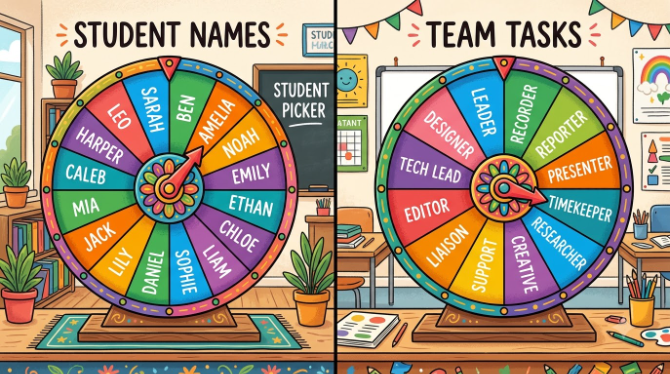
Our guide to what a spin the wheel tool is and how it works covers the basics in five minutes. Every use case below runs on the free tool at spinthewheelsonline.com — no account, no download.
Why This Simple Tool Actually Works
The name picker wheel's real strength isn't fairness in the abstract — it's how fair the process looks to the people standing around it.
When a teacher keeps calling on the same handful of students — even with the best intentions, even just because those hands go up first — the students left out notice. They build a story about who gets favoured, and that story sticks around long after it stops being true. Meetings have the same pattern: the same person always takes notes, the same person always runs the call, the same voice always gets heard first. Nobody says it out loud, but everyone feels the two-tier dynamic building underneath.
Take a person out of the selection step entirely, and the fairness stops being something you have to take on trust — it becomes something the whole room can watch happen. That visibility is the actual mechanism at work here, not just a nice side effect.
Calling on Students Without the Dread
The classic lolly-stick draw — names on sticks, pulled from a pot — gets a real upgrade from a wheel: everyone in the room watches it happen in real time, nobody can quietly slip a stick back in, and there's a genuine moment of shared suspense as it slows down.
Getting the anxiety level right comes down to how it's framed and how consistently it's used. Students who know anyone could be picked — not just the ones with their hands up — start preparing differently. But that only pays off if the wheel is a routine part of class, not a surprise tool for catching people out. Set the tone early: "everyone gets a turn," not "you never know when I'll catch you."
For anxious or quieter students, a simple rule helps a lot: give it your best shot, pass to a classmate, or say "give me a second" and circle back before the end of class. The wheel picks — the student still decides how to respond. That balance keeps the fairness benefit without adding unnecessary pressure.
Splitting Up the Jobs Nobody Wants
Every team has its unloved tasks: writing up meeting notes, booking the room, taking the first support ticket of the morning. When those jobs quietly land on the same one or two people again and again — even without anyone deciding it that way — resentment builds slowly and unevenly.
Handing the decision to a wheel takes it out of anyone's hands. Load the team and spin at the start of the week, sprint, or meeting, whatever fits the task. Whoever gets picked has a job that's hard to argue with — a wheel chose them, not a manager, not a colleague dodging it.
There's a bonus here too: it sometimes hands a task to someone who wouldn't normally take it on, which builds cross-team familiarity, spreads out institutional knowledge, and stops any one person from becoming the sole expert in something small but important.
Group Assignments Nobody Can Argue With
Group work assignment is one of the most sensitive moments in any classroom. Free choice recreates the same friendship clusters every time and leaves someone out. Teacher-picked groups get challenged too: "you did that on purpose," or "she always gets the good group." A wheel sidesteps both problems entirely.
The cleanest method uses two wheels in sequence: one with student names, one with group labels — Group A, Group B, Group C. Spin the name wheel to pick a student, spin the group wheel to assign them, repeat until everyone's placed. Since both steps are visibly random, no student has real grounds to argue the grouping was set up against them.
Turn on remove-after-spin for the name wheel so each student lands exactly once. If numbers come out slightly uneven, spin again to reassign the last name — keeping even that fix visibly random matters.
Rotating Who Runs the Meeting
Most meetings get run by the same person every time — usually whoever's most senior, or whoever sent the invite. Over time, that person builds strong facilitation instincts while everyone else stays passive. It also means the meeting keeps reflecting one person's priorities and style, which can slowly narrow what the team actually talks about.
A facilitator wheel breaks that pattern. Spin it at the end of each session to pick who runs the next one. That person owns the agenda, keeps time, and decides how to handle disagreements. For teams where some members have never run a meeting before, this builds facilitation skills faster than almost anything else — and it changes how those people show up as attendees, too.
For larger department meetings, a lighter version works well: spin to shortlist three candidates, then let them sort out who runs it. It keeps some flexibility while the selection stays visibly random rather than top-down.
Pairing People Up for Honest Feedback
Peer review is genuinely valuable — right up until people choose their own reviewers. Self-selected feedback tends to cluster around friendship rather than honesty: reviewers soften their notes, and recipients know it. The whole exercise loses most of its point.
A wheel assigns review partners with no regard for who's close to whom, which tends to produce more direct feedback from reviewers with nothing personal at stake, and recipients who read the pairing as fair rather than targeted. That neutrality gives both sides cover — the reviewer can be blunt because "the wheel put us together," and the recipient takes it as impartial, not personal.
In classrooms, spin to pair students one-to-one or in threes. At work, spin to decide who reviews whose code, writing, or design each cycle. Keeping a simple log of past pairings helps spread review relationships across the whole team over time instead of settling into the same informal pairs.
Keeping Retrospectives Fresh
Sprint retros fall into a predictable rhythm fast enough that teams often stop really thinking and start giving ritual answers: "what went well — communication; what didn't — estimation; what to change — better docs." Same format, same answers, sprint after sprint.
A retro-format wheel breaks the habit by picking the structure at random instead of defaulting to "start/stop/continue" every time. It might land on "five whys," the sailboat retro, or "one word per person." Different formats surface different things from the same team, and nobody can walk in with a rehearsed answer because they don't know the format in advance.
A second wheel can pick who presents each retro category, which spreads out the summarising work and stops one person from always framing the team's conclusions. This works particularly well for remote teams, where the same visible voice tends to dominate async discussion.
Deciding Who Reads or Presents First
Reading aloud and presentation order share a familiar problem: going first is nerve-wracking, going last gives extra prep time, and students who already know their slot tend to check out until it's their turn. Volunteer-based systems favour confident students; strict alphabetical order sentences the same few students to go first every single time.
A wheel keeps the next reader genuinely unknown until it lands. Students who might be called at any moment track the text more closely — they need to know where the class is, not just where their own paragraph starts. That passive attention shift alone is often reason enough for literacy teachers to switch.
For presentation order, spin it right when presentations begin — not days ahead. That stops early presenters from checking out once they're done and stops late-slot students from endlessly tweaking their work. The randomness itself is the structure.
Icebreakers That Don't Fall Flat
Icebreakers usually die the same way: the facilitator asks "does anyone want to share?" and the same three people answer while everyone else waits it out. Round-the-room is a bit better but still awkward — people either rehearse an answer or freeze when it's their turn.
A two-wheel setup fixes both problems at once: one wheel with names, one with question prompts. Spin the name wheel to pick a speaker, spin the question wheel to pick what they answer. The person picked gets a brief moment of attention, but on a question the wheel chose — not one that feels pointed at them.
This works especially well for the first five minutes of a weekly standup, the start of a new term, onboarding sessions, or the opening of any workshop where the group doesn't know each other well yet. It spreads out speaking time naturally and creates an energy shift that static round-the-room intros just don't.
A Prize Draw Nobody Can Dispute
Prize draws share the same weak point everywhere: whoever runs the draw is quietly suspected of tipping the outcome, even when they had nothing to do with it. A teacher with a child in the class who runs a hat draw will get raised eyebrows no matter who wins. A manager who hand-picks a name for a team prize faces the same suspicion.
Running the draw live on a wheel — projected on screen, every entry visible before the first spin — turns fairness from something people have to trust into something they can just see. Show the full list, display the wheel to the room, have someone other than the organiser click spin, and record the result. For school settings, our detailed walkthrough on running a school raffle using a spin wheel covers the whole process.
The same idea applies at work for any recognition draw, raffle, or end-of-year bonus spin. Record it and share it with the team afterward — nobody can dispute something they watched happen and can replay on demand.
Settling a Genuine Toss-Up Decision
This one's easy to overlook, but it's genuinely useful. Committees, teacher panels, and hiring groups sometimes land on a true deadlock — two candidates, two projects, two approaches that come out equal on every measure that matters. At that point, more deliberation usually just loops the same conversation without turning up anything new.
A wheel loaded with the two options makes a legitimate, defensible tie-breaker. It takes the decision out of any one person's hands, so nobody on the committee carries the weight — or the social cost — of having chosen. The process stays fair, documented, and hard to second-guess afterward.
One thing worth watching: the moment the result lands, notice your own reaction. If it lands on Option A and someone feels genuinely let down, that's a sign the group wasn't as evenly split as the discussion suggested. Treat that reaction as useful information — it can surface a preference the formal evaluation never quite captured. We dig into this more in our guide on when a Yes or No Wheel actually helps.
Setting One Up Takes About Two Minutes
-
Open spinthewheelsonline.com on any device
Go to spinthewheelsonline.com in any browser — no account, nothing to install. It runs on a classroom projector laptop, an office desktop, a workshop tablet, or a phone for a quick meeting.
-
Add names in the segment panel
Type or paste one name per line. For a class of 30, paste the whole list straight from your register spreadsheet. For a team of 12, typing them takes under a minute. Each name becomes one equally-sized wedge on the wheel.
-
Pick settings to match the use case
For cold-calling, reading aloud, or icebreakers where a repeat is fine — leave remove-after-spin off. For duty rotation, group formation, or prize draws where each name should land exactly once — turn it on. For peer review pairs, turn it on and plan ahead for an odd number of participants.
-
Bookmark the URL once it's set up
The wheel's URL stores your full setup. Bookmark it on your classroom computer, browser favourites, or office laptop — one bookmark per class or team works well. Reload it at the start of every session with nothing to re-enter.
-
Project it so everyone actually sees it
The fairness benefit only lands when the whole group watches the spin together. In classrooms, put it on the projector in fullscreen. In meetings, share your screen or the room display. When everyone sees the same spin at the same moment, the result feels shared, not just announced.
A name picker wheel is just a spin wheel where the segments happen to be people rather than prizes or outcomes. Same mechanics apply — equal odds per segment, remove-after-spin, custom colours — the difference is purpose: selection rather than assigning an outcome. See our comparison of the name picker against other random selection tools in spin wheel vs. other random pickers.
Name Picker Wheel vs. Other Selection Methods
Before digital wheels, teachers and managers relied on a handful of other random-selection tricks. Here's how they stack up on what actually matters in practice:
| Method | Looks Fair to the Group? | Repeatable / Recordable? | Fast in Practice? | Best For |
|---|---|---|---|---|
| 🎡 Name Picker Wheel | ✓ Yes — everyone watches | ✓ URL saves full setup | ✓ One click per pick | Both All group settings |
| 🧪 Lolly stick / name cards | Partly — the stick can be seen | ✗ No record | Slow — needs a physical shuffle | School Small classes |
| 🙋 Hand-raising | ✗ Favours confident students | ✗ No record | ✓ Instant | School Volunteer tasks only |
| 📋 Fixed rota | Partly — transparent but rigid | ✓ Spreadsheet-based | ✓ No decision needed | Work Predictable duties |
| 🎲 Random number generator | Partly — not visually engaging | Partly — screenshot only | ✓ Fast | Both Remote / async settings |
| 👆 Manager chooses | ✗ Reads as biased | ✗ Nothing to verify | ✓ Instant | Never for disputed duties |
🎯 Build Your Name Picker Wheel Now
Free, instant, no account needed. Load your class list or team names, bookmark the URL, and it's ready every time you open it.
Open Free Name Picker Wheel →