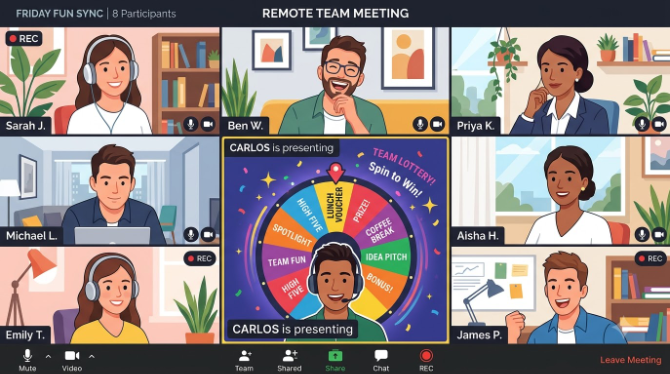
- The Decision That Shouldn't Take Five Minutes
- Why a Wheel Fits the Remote Context Specifically
- Using It Inside Live Meetings
- Remote Team-Building Activities
- HR & Operations Use Cases
- Where It Fits Alongside Your Existing Stack
- Setting It Up for Your Team in 3 Minutes
- What Actually Makes This Work
- Frequently Asked Questions
- Conclusion
Remote work removed a lot of friction — commutes, office politics, geographic hiring limits. It also quietly introduced a new one: small decisions that used to resolve themselves in a hallway now eat real minutes of a scheduled call. Who presents first? Which topic gets tackled today? Who runs point on the retro? In an office, these get settled by a glance or a raised hand. On a call, they become an awkward pause while everyone waits for someone else to volunteer.
A free online wheel spinner is a strangely effective fix for exactly this kind of friction — not because it's sophisticated, but because it's visible, fast, and nobody has to be the one who decides. This guide covers where remote teams are actually using it in 2026, and just as importantly, where it isn't the right tool.
New to wheel spinner tools? Our plain-language guide to what a spin the wheel tool is and how it works covers the basics in under five minutes — worth reading before the team-specific setups below.
1. The Decision That Shouldn't Take Five Minutes
In a physical office, a huge amount of low-stakes decision-making happens ambiently. Someone reaches for the whiteboard marker. Someone starts talking and the room follows. Nobody consciously decides who goes first — the room's social dynamics just handle it.
Remote, that ambient handling disappears. Every micro-decision now needs either someone to explicitly volunteer, a Slack poll that generates its own notification noise, or a silent pause on a call waiting for someone to speak. Two patterns tend to show up as a result:
- Decision load concentrates at the top. Managers and senior team members end up making the small calls simply because they're the ones willing to break the silence — which creates the feel of a hierarchy even on genuinely flat teams.
- Rotations start to feel uneven. Who presents, who takes notes, who runs the icebreaker — without a visible system, this starts to feel unequal, and remotely there's no informal give-and-take happening in the background to balance it out the way there might be in person.
A wheel addresses both directly. It removes the awkwardness of picking by handing the decision to a neutral tool, and because everyone watches the same shared screen, the outcome is visibly fair rather than reported after the fact.
2. Why a Wheel Fits the Remote Context Specifically
Everyone sees the same result at once
Screen-share the wheel and the whole team watches it land in real time — nobody is just told the outcome after the fact.
Zero setup once it's built
Bookmark a wheel once and it's ready before any future call — a "who presents today" wheel takes a couple of minutes, ever.
No one is put on the spot by a person
The tool decides, not the facilitator — useful when newer or junior team members might otherwise defer to whoever speaks first.
No install, no timezone dependency
A saved link works the same for someone in Sydney and someone in London — no download, no account, no region lock.
For more on why people trust and accept a randomized outcome more readily than one a person chose, see the psychology behind random decision making — it's written broadly, but the reasoning maps directly onto why a wheel-picked speaking order gets less pushback than a manager-picked one.
3. Using It Inside Live Meetings
These are the recurring in-meeting scenarios where teams reach for a wheel instead of open discussion:
-
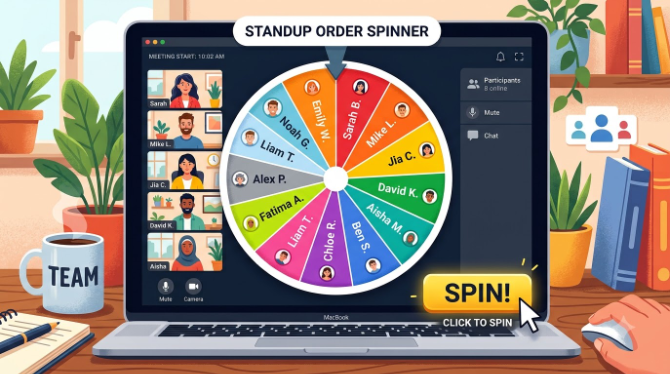
Picking who presents or reports first Load team names into a wheel and spin for standup or sprint-review order. Turn on "remove after spin" to work through the full list before anything repeats.
-
Rotating facilitator and note-taker Keep a standing "meeting roles" wheel and spin at the start of each call. Over a few weeks the distribution evens out on its own — no roster to maintain.
-
Breaking a tied vote When a decision splits evenly and more discussion won't move anyone, spin to break the tie. Since everyone agreed to the method, everyone accepts the result.
-
Choosing which agenda item goes first For items of similar priority, spin to decide the order — stops lower-priority topics from eating the whole meeting just because they were listed first.
-
Genuinely undecided yes/no calls For a question the team is truly torn on — push this to next sprint or not? — the Yes or No Wheel is a quick way to move past analysis paralysis. See when to use a Yes or No Wheel for more.
-
Picking the opening icebreaker question Load 15–20 questions and spin at the start of a call before the meeting proper begins — a light, low-effort ritual that tends to warm up participation for the rest of the call.
Teams that spin for speaking order often notice standups run shorter than ones using open volunteering — mostly because knowing your turn is coming pushes you to prepare instead of wait around to feel ready. It's a small mechanical shift, not magic.
4. Remote Team-Building Activities
Recreating the informal social glue an office provides for free is one of the harder parts of managing remotely, and forced team-building often backfires. A wheel helps here because it feels light and game-like rather than mandatory — even when it isn't.
Trivia category spinner
Run a 10-minute end-of-week trivia round where the wheel picks each round's category — Science, Pop Culture, Company History. No host prep beyond building the wheel.
Rapid drawing challenge
Load 20 drawing prompts. Everyone draws for 60 seconds, shares on camera, spin for the next prompt. Ten minutes, zero cost, reliably funny.
Coffee-chat pairing
Spin the whole team to create random pairs for a 15-minute informal chat during the week — a common way larger remote teams build cross-functional relationships.
Recognition draw
Use the wheel to pick a shoutout recipient at an all-hands — weighting entries by adding a name more than once for a standout month. Pair with our guide to running fair prize draws for bigger programmes.
Random project pairing
Spin to create cross-functional pairs for a knowledge-sharing task — surfaces working relationships that wouldn't happen organically and removes any sense of favouritism in assignments.
Show & tell picker
For recurring "show and tell" sessions, spin to pick who presents next or what topic they cover. Low stakes, consistently good engagement.
When meeting roles rotate through a visible wheel instead of an informal or manager-driven pattern, people tend to report the process feels more even-handed — not because the outcomes changed dramatically, but because the fairness of the process is now something everyone can see for themselves. The same dynamic shows up in classroom settings where teachers use a wheel to call on students.
5. HR & Operations Use Cases
Beyond routine meetings, HR and ops teams have found specific, recurring spots where a wheel provides a transparent, low-admin alternative to a spreadsheet or a manager judgment call.
- Leave-slot allocation. When several people request the same period off and there aren't enough spots, a wheel draw is a process everyone can understand and accept — it removes any suspicion that seniority influenced the outcome.
- Oversubscribed training seats. For internal workshops with limited places, add every applicant and spin to fill each seat — transparent, and a screen recording doubles as proof of process.
- Informal on-call coverage. Small teams without a formal rota sometimes spin to assign a given week's coverage rather than trading messages back and forth.
- Reward and recognition draws. For quarterly incentive schemes or employee-of-the-month picks, a live wheel spin makes the result hard to dispute and turns the announcement into an actual moment. Our step-by-step guide to fair prize draws covers this in depth.
- Topic assignment for internal pitches. When an innovation challenge needs participants assigned to constraints or topics, a wheel allocates them neutrally, so no one gets an easier brief by design.
6. Where It Fits Alongside Your Existing Stack
Remote teams already run on Slack, Zoom, Notion, Jira, and a dozen other tools. A wheel isn't a replacement for any of them — it fills one specific gap that none of them cover well: a live, visibly neutral, instant random pick.
| Tool | Best for | Random / fair selection | Visible to the group live | Setup needed |
|---|---|---|---|---|
| 🎡 Spin the wheel | Random picks, rotations, draws | ✔ Built for it | ✔ Spin animation | ✔ None, once built |
| 💬 Slack poll | Team opinion gathering | ✘ Votes, not random | ✘ Text only | ✔ Built-in |
| 📋 Notion / docs | Structured rotas, records | ✘ Manual | ✘ No animation | ✘ Needs upkeep |
| 📊 Miro / Mural | Visual collaboration, voting | ✘ No random selection | ✔ Shared canvas | ✘ Requires workspace |
Use Slack or Notion when a decision needs deliberation, a written record, or async input across timezones. Use the wheel when you need a visibly fair pick made live, in under thirty seconds, with nobody having to be the one who chose. See Spin the Wheel vs. other random pickers for a broader comparison.
7. Setting It Up for Your Team in 3 Minutes
-
Open the tool
Go to spinthewheelsonline.com in your browser — no login, no install, works on Chrome, Firefox, Safari, and Edge.
-
Add your team's names
Type or paste team member names into the entry panel — copy-pasting from a Notion doc or spreadsheet works fine.
-
Build one wheel per purpose
Speaking order, meeting roles, activity picks — separate wheels, each saved as its own bookmarked link.
-
Share the link if the team should spin independently
Anyone with the URL can spin — no account needed on their end.
-
Screen-share and spin during the call
Turn on sound for the ticking effect, and enable "remove after spin" for anything where each person should come up exactly once.
Build your standard wheels once — before the first Monday standup of a new sprint is a good moment. From then on, each one is a bookmark click away with zero prep for every meeting after. For more format ideas, see creative ways to use a name picker wheel at work.
8. What Actually Makes This Work
- Agree the wheel is final before the first spin. State it explicitly: whatever it picks, the team honours it, no re-spinning because someone didn't like the result. Without this norm stated upfront, the tool loses its value the first time someone asks for a do-over.
- Keep the sound on during the screen-share. The ticking as it slows down is most of what makes a spin feel like a small event rather than a utility. Check once that your platform passes desktop audio through, then leave it on.
- Use "remove after spin" for anything rotation-based. Speaking order, role assignment, prize draws — this keeps the same person from being picked twice and makes the distribution provably fair over time.
- Drop a shared link for async calls. For decisions that don't need a live meeting — like picking next month's social format — post the link in Slack: "first person to spin decides." Fast, playful, no meeting required.
- Add a wildcard entry to activity wheels. One entry labelled "team pick" gives the group a rare moment of collective choice if it lands, without giving up the structure the rest of the wheel provides.
🎡 Ready to Try It in Your Next Meeting?
Build your team's wheel in under 3 minutes — no account, no cost, no installation.
Open Free Wheel Spinner →9. Frequently Asked Questions
Can multiple people access and spin the same wheel at the same time?
Each device runs its own instance. For live team use, one person — usually the facilitator — screen-shares and spins. For async use, share the link with instructions on who spins first. There's no real-time multiplayer sync, which is fine for most remote-team scenarios.
Is it actually random, or can the person spinning influence the result?
It's genuinely random — the outcome is set by a random number generator before the animation even starts, so it isn't something a facilitator can time or influence. See is a digital spin wheel truly random? for the full explanation.
Will it work during a Zoom, Teams, or Google Meet screen-share?
Yes — it works on all major video conferencing platforms. Share your browser tab and, if you enable system audio sharing, the ticking sound comes through too.
What if someone is absent from the meeting?
Remove their entry before spinning. If a spin lands on someone who's absent, just spin again — the wheel has no memory of previous spins unless "remove after spin" is on, in which case their slot is already out of the pool for that session.
What's the best way to use it for a fully async team?
Share the wheel URL in your team channel with a clear instruction — "spin this to decide X, first click makes the call." Whoever spins can screenshot the result if you want a record. No extra process overhead.
Is there a limit to how many team members I can add?
No limit — the wheel scales to display as many entries as you add. For very large teams, it's common to only load the subset attending a given session.
10. Conclusion
The interesting thing about a spin wheel as a remote-work tool is how little it does, mechanically, compared to how much friction it removes. It doesn't manage projects or store data — it just gives a group of people who can't read each other's body language a fast, visibly fair way to make a small decision together.
Remote teams don't need more complex tools; they need specific, lightweight fixes for specific friction points. This is one of the better ones — no procurement, no onboarding, no ongoing cost.
Teams that get the most out of it do two things: agree the "wheel is final" norm on day one, and build a small library of saved wheels for their most recurring situations. Once those exist, every meeting that uses them runs a little more smoothly.
Visit spinthewheelsonline.com, build your first team wheel before your next call, and try it once. That's usually enough to see whether it earns a permanent spot in your meetings.
- Remote teams use a wheel to resolve micro-decisions in seconds during live calls — speaking order, role rotation, tie-breaking, activity picks.
- The advantage over polls and spreadsheets is visible transparency — everyone watches the result happen on a shared screen at once.
- HR and ops teams use it for leave allocation, training slots, reward draws, and topic assignment where perceived fairness matters.
- It complements — doesn't replace — tools like Slack, Notion, and Zoom by filling the specific gap of live, neutral, random selection.
- Build your team wheels once, bookmark them, and every meeting after has zero extra setup.
- Explore more in running fair prize draws and the psychology of random decisions.