Spin Wheel Icebreakers for Onboarding — A 2026 Playbook for HR Teams
A new hire's first meeting is the one everyone in the room has done a hundred times and the new person has done zero times. This is a working playbook — not a listicle — for closing that gap with a spin wheel: six wheel setups you can copy directly, a short script for running the room, and the specific ways this exercise goes wrong.
If you haven't used one of these before, start with What Is a Spin the Wheel Tool and How Does It Work? for the short version of how the randomization works and how to build your first wheel. Then come back here for the onboarding- specific setups.
1. What Actually Goes Wrong in Day-One Intros
Watch a typical first-day round of introductions and you'll notice the same failure pattern almost every time. The facilitator says "let's go around and share something fun about yourself," and there's a beat of silence before the first brave (or nearest) person starts. By the third or fourth person, the answers have collapsed into the same three templates — a hobby, a pet, a hometown — because everyone is quietly copying the format set by whoever went first.
The new hire, meanwhile, is doing three things at once: trying to remember a dozen new names, trying to read the room's sense of humor, and trying to figure out what "fun fact" even means in a context where they don't yet know what's considered normal here. That's a lot of cognitive load for one exercise that's supposed to be relaxing.
There's also a quieter problem: who picks who goes next. If a manager points at people, it can feel like being called on in class. If it's left open, the same two or three confident people jump in every time and the quiet ones — often including the new hire — never get pulled in. Neither pattern is anyone's fault. It's just what happens when a human has to make a selection decision in real time in front of the group.
A spin wheel doesn't fix the content problem on its own — you still need decent questions — but it removes the selection problem entirely, and it breaks the copy-the-previous-answer pattern because each spin can land on a genuinely different prompt.
2. Why Handing the Decision to a Wheel Helps
The mechanism is simple and it shows up in plenty of group settings beyond onboarding — the same logic is behind why teachers use it to call on students and why remote teams use it for lightweight decisions. When the outcome comes from a visibly neutral process, people accept it faster and with less second-guessing than when a person chooses.
No one is "called on"
The wheel picks, not the facilitator — which matters most for a new hire who doesn't yet know the room's social rules.
Breaks the copy pattern
Going in a fixed order lets everyone anchor on the first answer. A random spin means the next question can be unrelated to the last one.
Naturally paces the room
One spin, one question, one answer. It's a built-in timer that stops any single person from running long.
Reusable with zero rebuild
Build the wheel once, bookmark the link, and every future new hire gets the same setup with no prep required.
For the underlying research on why people trust and cooperate with randomized processes more readily than human-made ones, see our piece on the psychology behind random decision making — it's written for group facilitation generally, but every point in it maps directly onto a first-day intro round.
3. Six Wheel Setups You Can Copy Right Now
These are ready to paste into a wheel on spinthewheelsonline.com. Each one is built for a different moment in the onboarding timeline — pick the one that matches where your new hire actually is, not necessarily the first one on the list.
🎡 Wheel 1 — First-Day Question Spinner
One wheel, one spin per person. Turn on "remove after spin" so no question repeats during the session.
- What's a job you had before this one that nobody would guess?
- What's a small thing that instantly puts you in a good mood?
- What's something you're weirdly good at outside of work?
- What's the last thing you got way too into?
- If you had a free Tuesday, what would you actually do with it?
- What's a place you'd go back to in a heartbeat?
- What's on your desk or desktop that says something about you?
- What's a skill you're currently trying to pick up?
- Dogs, cats, or "I have opinions about neither"?
- What's a show or podcast you've told three people to watch/listen to this year?
- What's your go-to order at a coffee shop?
- What's something you learned recently that surprised you?
🎡 Wheel 2 — Structured Self-Intro Prompts
This wheel doesn't pick a question — it picks a format for each person's 30-second intro, so everyone gives roughly the same amount of information without it sounding scripted.
- Name, role, and how you actually spend your weekends
- Name, role, and where you grew up
- Name, role, and what you wanted to be as a kid
- Name, role, and the last thing you binged
- Name, role, and your first-ever job
- Name, role, and something most people don't know about you
- Name, role, and what made you laugh recently
- Name, role, and one thing you're learning right now
🎡 Wheel 3 — Category Picker for "Two Truths, One Lie"
Everyone prepares two truths and a lie, but the wheel decides which category they have to draw from — which stops people from defaulting to the same safe answer every time. Works for groups of four to twenty.
- Travel
- Childhood
- Work & career
- Hobbies & skills
- Food
- Brushes with fame
- Awards or achievements
- Odd fears or pet peeves
Give everyone sixty seconds to think after the category lands, before anyone shares. Without a pause, whoever's up first is improvising while everyone else gets prep time — which isn't fair and usually shows.
🎡 Wheel 4 — Simultaneous "This or That" Round
Best for larger groups. Spin, everyone answers at once (thumbs up or down on a call, raised hands in a room), no individual prep needed. New hires learn how the team actually works faster than any handbook would tell them.
- Camera on or camera off?
- Written brief or a quick call?
- Reply right away or batch messages later?
- Plan the day or wing it?
- Meetings in the morning or afternoon?
- Work from a café or from home?
- Deep focus blocks or constant check-ins?
- Big team energy or small-group energy?
🎡 Wheel 5 — "Ask an Expert" Finder
Put every current team member's name on one wheel and a set of topics on a second. Spin both — that person shares a real tip or story on that topic. This is the one that actually surfaces the knowledge that usually only lives in people's heads.
- The shortcut nobody tells new people about
- A mistake you learned the most from
- A tool the team underuses
- Something you wish someone told you in week one
- An unwritten rule that actually matters here
- Who helped you most when you were new
- The strangest request you've ever gotten from a client
- An underrated resource most people skip
🎡 Wheel 6 — First-Week Wrap-Up Draw
Run this at the end of week one, and let the new hire spin it themselves. After a week of being told what to do, handing them the spin for something good is a small but real shift in who's in control.
- Team lunch — you pick the place
- Leave an hour early on Friday
- 15 minutes with the founder or a senior leader
- Pick next week's team activity
- A small learning-budget top-up
- Run a 10-minute "teach us something" session
- Work from wherever you want for a day
- Team trivia or a short game session
🔗 Related Guides
4. Matching a Wheel to the Room
Not every setup fits every moment. This is the quick-reference version — match your scenario to the wheel above before you build anything.
| Scenario | Use This Wheel | Group Size | Time |
|---|---|---|---|
| First-day team intro | Wheel 1 — Question Spinner | 4–12 | 10–15 min |
| All-hands welcome | Wheel 4 — This or That | 12–50+ | 5–8 min |
| 1:1 with the hiring manager | Wheel 2 — Structured Intro | 2 | 5 min |
| Week 2–4 check-in | Wheel 5 — Ask an Expert | 6–15 | 15–20 min |
| Cross-team mixer | Wheel 3 — Two Truths, One Lie | Mixed groups | 15–25 min |
| End of week one | Wheel 6 — Wrap-Up Draw | Any | 5 min |
5. Running It on a Video Call
Remote onboarding has one problem in-person doesn't: the new hire is meeting a grid of faces that already have history with each other, and they can't read any of the physical-room cues that normally fill in the gaps. A shared screen with a wheel on it gives the call something to look at besides a face — which takes real pressure off everyone.
- Load the wheel before the call starts. Nothing kills momentum like building it live while people watch.
- Screen-share the tab the moment intros start — Zoom, Teams, and Meet all pass the spin animation through cleanly.
- Share desktop audio if your platform allows it. The tick as the wheel slows adds real suspense even through a screen.
- Turn on "remove after spin" for anything where each person or question should only come up once.
- Bookmark the wheel's URL. The setup lives in the link, so the next session takes zero rebuild time.
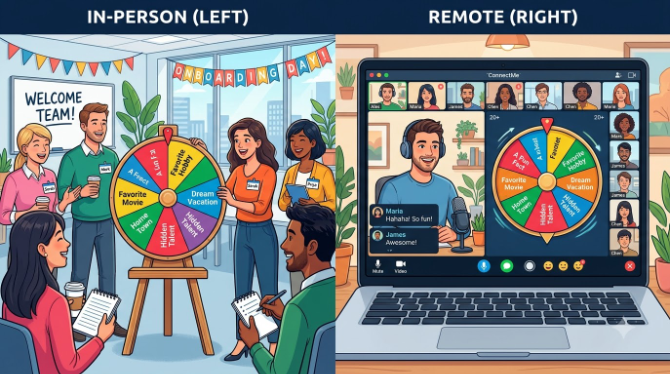
If some people are in the room and some are remote, project the wheel on the room's screen and share it on the call at the same time. Both groups watching the same spin land is a small detail, but it's the difference between "the remote people joined" and everyone actually being in the same activity.
6. A Facilitator's Script (What to Actually Say)
The wheel does the picking, but someone still has to open and close the exercise. Here's a script you can adapt rather than winging it cold.
"We're going to do a quick round with this wheel instead of going in order — it'll land on someone at random, they answer whatever question it picks, and then we spin again. If you land on something you'd rather skip, there's a pass option — just say pass and we'll spin again, no explanation needed."
Spin, read the result out loud, and give the person a beat before they have to answer — even two seconds of silence feels longer than it is. If the room's low-energy, answer a question yourself first to reset the tone.
"That's everyone — thanks for playing along. [New hire], anything you heard that you want to follow up on later? That's usually a better way to build on this than anything I could plan."
7. The Mistakes That Quietly Kill It
Do: state the "no re-spins" rule upfront
Saying it once, before the first spin, prevents anyone from quietly lobbying for a redo later.
Do: let the new hire go first
Handing them the first spin signals the team is genuinely making room, not just going through motions.
Do: build in a pass option
One "pass, spin again" entry respects whatever reason someone has for skipping, without needing to know it.
Don't: reach for personal topics
Family, health, religion, and relationships create discomfort in a professional first meeting — keep it light.
Don't: run it past 15 minutes
The exercise that people enjoy at ten minutes is the one people dread at twenty-five. Time-box it.
Don't: skip it for senior hires
Experienced hires get left out of icebreakers under the assumption they don't need one — they usually enjoy it more, not less.
8. Setting Up Your Wheel in Under 3 Minutes
- Open spinthewheelsonline.com — no account, works in any browser on any device.
- Paste one of the entry lists above into the entry panel — they load instantly, no reformatting needed.
- Turn on "remove after spin" for question or name wheels where repeats would kill the energy.
- Bookmark the URL — the wheel's state lives in the link, so it's ready every time with no rebuild.
- Build one wheel per moment — day one, week two, week four — and save each as its own bookmark.
Set aside fifteen minutes once to build all six wheels above and save them in a shared bookmarks folder. Whoever's running the next new-hire session just opens the right link — no facilitator dependency, no rebuilding from scratch.
How This Compares to Other Icebreaker Formats
| Format | Neutral selection | Scales up | Remote-friendly | Zero prep after setup |
|---|---|---|---|---|
| 🎡 Spin wheel | ✔ | ✔ | ✔ | ✔ |
| ⬆️ Go around the table | ✘ | ✘ | ✔ | ✔ |
| 🃏 Printed question cards | ✔ | ✘ | ✘ | ✘ |
| 🤝 Open volunteering | ✘ | ✘ | ✘ | ✔ |
For a broader comparison of random-selection tools beyond onboarding, see Spin the Wheel vs. other random pickers.
9. How to Tell If It's Actually Working
You don't need a survey to know whether this is landing. A few informal signals are usually enough:
- People are still talking to each other after the wheel exercise ends, unprompted.
- The new hire references something from the round later that week — a name, a joke, a shared interest.
- Veterans engage instead of visibly waiting for their turn to be over.
- The next new hire's session doesn't need you to explain the format twice.
If none of that is happening after a couple of sessions, the wheel probably isn't the problem — it's usually the questions being too generic, the group being too large for the format, or the exercise running too long. Adjust those before dropping the tool altogether.

🎡 Build Your First Onboarding Wheel
Free, no sign-up, ready in under three minutes.
10. Frequently Asked Questions
Does this work for a 40-person onboarding cohort?
Yes, with a format change. Use a simultaneous-response wheel (Wheel 4 above) so everyone answers each spin at once instead of waiting for individual turns. For anything needing one-on-one answers, split into breakout groups of eight to ten.
Is a digital spin wheel actually random?
Yes — the result is set by a random number generator before the spin animation even starts, so it isn't something a facilitator can time or influence. See is a digital spin wheel truly random? for the full technical explanation.
What if someone lands on a question they'd rather not answer?
Build a "pass, spin again" entry into the wheel from the start. It's a quiet, built-in way out that doesn't single anyone out or require an explanation.
Does it work for a 1:1 onboarding meeting with a manager?
It works particularly well there — it takes the "interview" feel out of a manager asking questions one after another. Use Wheel 2 and have the manager answer their own spins too; that reciprocity is what actually builds rapport, more than the questions themselves.
Can I make certain questions come up more often?
Yes — duplicate the entry. Each entry is an equal-size slice of the wheel, so adding a second copy roughly doubles its odds of coming up.
Does it work on mobile?
Yes — spinthewheelsonline.com runs on any device with no install. Facilitators usually run it from a laptop and share their screen, but it works fine from a phone too.
- Day-one intros fail less because of bad questions and more because of who has to decide who goes next — a wheel removes that decision entirely.
- Six ready-made wheel setups are included above: a question spinner, a structured intro prompt, a two-truths category picker, a this-or-that round, an ask-an-expert finder, and a week-one wrap-up draw.
- The same setup works in person, on a video call, or split across both.
- A pass option, a 15-minute time box, and light (not personal) questions are what keep it appropriate for a professional setting.
- Explore more in team building with spin wheels, name picker wheels at work, and the psychology of random decision making.