How HR Teams Use Spin Wheels for Employee Recognition & Office Events
Recognition programmes rarely fail because a company doesn't care — they fail because the process behind them is invisible. Nobody sees how a name was chosen, so nobody fully trusts the result. A growing number of HR teams have started running recognition, prize draws, and office activities through a free spin wheel instead, precisely because the whole team can watch the decision happen in real time.

1. The Employee Recognition Problem in Modern Workplaces
Ask most HR professionals to name their hardest ongoing challenge and recognition programmes tend to come up quickly — not because leadership doesn't value them, but because getting the mechanics right is genuinely difficult. The same handful of names keep surfacing for awards, the selection logic isn't visible to anyone outside the room where it happened, and the people who most need to feel noticed are often the ones least likely to self-promote.
Three patterns tend to undermine these programmes. Managers rarely have full visibility into everyone's contributions, however well-intentioned they are. Selection processes create a perception — sometimes accurate — that proximity to leadership matters more than output. And the announcement itself usually lands flat: an email, a Slack message, a line in a meeting people have already tuned out of.
A spin wheel addresses all three at once. It introduces a visibly random mechanism that anyone can watch happen. It takes the burden of justifying a subjective pick off the manager's shoulders. And the live spin — watched by the whole team — turns an announcement into an actual moment worth remembering.
2. Why Spin Wheels Work for HR Specifically
Plenty of random-selection tools exist — spreadsheet formulas, names in a hat, dice. Six specific properties explain why the spin wheel has become HR's tool of choice in particular.
It Creates a Visible Moment
Played live on a shared screen, the spin animation turns a decision into an event. Recognition that happens in public carries more weight than a name in a newsletter.
It's Provably Fair
Anyone watching can see the result wasn't predetermined. There's no back-room decision — particularly valuable where trust in management has been eroded by perceived favouritism.
No Choice to Justify
When the wheel decides, HR isn't stuck defending a subjective pick. The process is the justification — and everyone agreed to it beforehand.
Zero Tech Overhead
No procurement, no software approval, no employee accounts. Any HR professional can build a recognition wheel in a browser and run it from any device.
Customisable & Weighted
Add any entry — names, activities, prizes, questions — and duplicate an entry to weight it. The tool stays neutral even when the inputs aren't uniform.
Reusable Across Events
Build once, bookmark, reuse for every meeting, quarterly award, or offsite. Your HR wheels build into a ready-made library over time.
It's also worth understanding the underlying psychology behind random decision-making: people consistently accept outcomes from a neutral, visible process more readily than outcomes chosen by a person — even when the practical result is identical.
3. Recognition Use Cases: From Monthly Draws to Shoutout Wheels
These are the recognition formats HR teams currently run most often with a spin wheel, each with a configuration you can copy directly.
Employee of the Month Draw
Instead of a manager-only nomination that's invisible to most of the team, open the draw to everyone who clears a basic performance bar. Add qualifying names to the wheel and run it live at the monthly all-hands.
To weight without making it obvious, add stronger performers' names two or three times. The wheel remains the neutral mechanism — the input weighting stays an internal HR call.
- Sarah K.
- Tom R.
- Priya M.
- James L.
- Anita V.
- Raj P.
- Emma C.
- Dev N.
Quarterly Incentive Prize Draw
For larger quarterly draws — vouchers, extra leave days, experience rewards — running the wheel live on an office screen lands far better than an email. Enable "remove after spin" to work through several prize tiers without repeats.
For running a credible, verifiable draw end to end, see our guide on how to pick a fair random winner for giveaways and prize draws.
- £100 Gift Card
- Half-Day Leave
- Team Lunch
- Premium Subscription
- Experience Day
- £50 Amazon
Weekly Shoutout Spotlight Wheel
At the close of each weekly team meeting, spin a wheel loaded with everyone's name. Whoever it lands on gets a 60-second "shoutout spotlight" — a manager or peer shares one thing they did well that week.
Because everyone eventually gets a turn, the randomness removes the awkwardness of one person always being picked and another always being overlooked. This works equally well for remote teams and in-person offices.
Values Award Draw
Collect peer nominations tied to company values through a simple form or Slack channel. Each nomination earns the nominee one entry; multiple nominations multiply entries. Run the draw live at the all-hands, explaining the weighting openly so it reads as fair rather than arbitrary.
This combines the depth of peer recognition with the visible drama of a live draw, and scales cleanly — a 200-person company runs this with no added admin beyond collecting form submissions.
4. Office Event Planning: Activities, Games & Icebreakers
Office events — team days, seasonal parties, departmental offsites — come with a long tail of small decisions HR is usually left to resolve alone: who leads which activity, what game comes next, who draws first in a raffle. A spin wheel handles all of it, and makes the event feel participatory instead of managed from the top.
🧊 Icebreaker Question Wheels
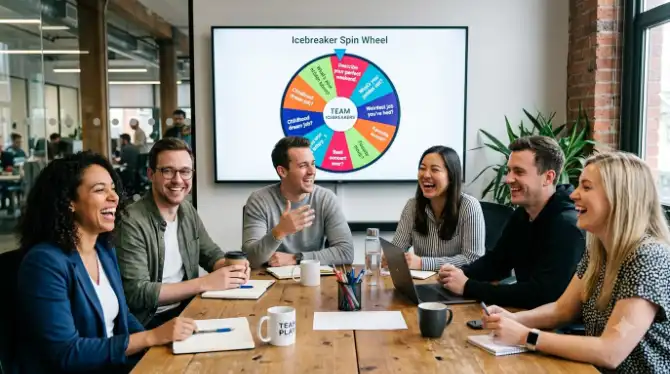
Load 20–30 icebreaker questions onto a wheel before any team event. Spin for the first question, let everyone answer, spin again. The randomness takes the facilitator out of the awkward position of choosing who gets the "easy" question.
- Dream holiday destination?
- One skill you'd love to learn?
- Favourite thing about this team?
- Swap roles for a day — which one?
- Best career lesson so far?
- Proudest moment this quarter?
- Hidden talent?
- One perk you'd add?
🎲 Team Game Activity Selector
For team days with several activity options — trivia, pictionary, an escape-room challenge, a quiz — add every option to a wheel and let the group spin to decide what happens next. It removes the five-minute debate about what to do and builds buy-in, since nobody can object to an activity they all watched the wheel select. The same approach works well for family-style celebrations — the principle transfers directly from a department to a household.
🤝 Team Pairing for Event Activities
For charity-challenge pairs, cooking-competition teams, or buddy assignments, use the wheel to build pairings on the spot. Add all names, spin for the first pair, remove those names, spin again. A full department is split into teams in under three minutes with zero perception of favouritism.
🎤 Presentation & Speaking Order
At departmental showcases, lunch-and-learns, and "show and tell" sessions, use the wheel to set the presenting order. For more on name-based wheel uses at work, see our guide on creative ways to use a name picker wheel at work.
5. Fair Resource Allocation: Leave Slots, Training & Perks
One of the most practically useful HR applications is resource allocation. Whenever demand for something limited outstrips supply, someone has to decide who gets it — and that decision, however well-meant, creates winners, losers, and doubts about fairness.
| HR Resource Situation | Traditional Method | Spin Wheel Approach | Key Benefit |
|---|---|---|---|
| Multiple staff request the same holiday slot | Manager discretion or seniority | All requestors added, spin live | ✔ No seniority bias |
| Oversubscribed training course | First-come-first-served or manager sign-off | All applicants added, spin per seat | ✔ Transparent allocation |
| Limited premium desks / hot desks | Seniority or manager assignment | Weekly or monthly spin for premium spots | ✔ Everyone gets a turn |
| Conference ticket allocation | Manager picks based on role fit | Qualifying names on wheel, live draw | ✔ Verified fair process |
| Perk selection (WFH days, flexible Fridays) | Ad hoc or informal negotiation | Monthly draw from eligible pool | ✔ Predictable rotation |
The wheel doesn't remove HR's judgment entirely — deciding who qualifies for the draw is still a human call. But once the eligible pool is set, allocation runs through a process everyone can watch and trust. Our step-by-step guide to fair prize draws covers the mechanics in full.
6. Onboarding & New Hire Integration
The first weeks at a new job are full of quiet social friction — new hires aren't sure where they fit, existing staff aren't sure how to bring them in, and HR is trying to speed up a process that usually takes months. A spin wheel turns out to be a surprisingly effective way to lower that barrier fast.
Onboarding Buddy Assignment
Rather than HR manually assigning buddies, add volunteer names to a wheel and spin the pairing live during the new hire's welcome session. Watching the process happen signals from day one that the organisation values transparency.
First Team Meeting Icebreaker
Add the new hire's name to the team icebreaker wheel from day one. Their first shoutout or icebreaker moment tells them they're already a full team member, not still on probationary observer status — a small signal that carries real weight in how quickly someone feels they belong.
Yes/No Onboarding Check-Ins
For light-touch check-ins, a Yes or No Wheel can turn a formal question into something lighter: "Has this week felt manageable? Spin to decide if we need an extra catch-up." The act of spinning tends to surface the honest answer even when the result gets overridden. Our guide on when to use a Yes or No Wheel covers this effect in more detail.
7. Setting Up Your HR Wheel in 5 Minutes
A common reason spin wheels haven't spread further inside HR teams is the mistaken idea that they need technical setup. They don't. Here's the exact process for building a reusable recognition wheel from scratch.
- Open spinthewheelsonline.com in any browser — no account, no download, no login. Works on Chrome, Firefox, Safari, and Edge, on laptop, tablet, or phone.
- Clear the default entries and paste in your team member names. For a 20-person team this takes about 90 seconds, and copy-pasting from a spreadsheet or Slack member list works cleanly.
- Adjust the wheel colours if you like — optional, but noticeable when it's projected during an all-hands.
- Enable "Remove after spin" for anything that needs to work through a full list without repeats — speaking order, prize tiers, buddy assignments.
- Bookmark the wheel's URL — entries are preserved in the link itself. Save separate bookmarks for recognition, icebreakers, and activity selection; no login required, the link is the save.
- Screen-share during the event — the spin animation and sound both carry through on Zoom, Microsoft Teams, and Google Meet screen-shares.
8. Best Practices for HR-Led Spin Events
These are the habits that separate HR teams getting lasting results from those who try it once and drop it.
- Announce the process before the result. Explain who's in the draw and why, before spinning. That thirty-second explanation is what gives the result its legitimacy.
- Run it live, not offline. Spinning privately and announcing the result afterward loses most of the benefit — the transparency is the entire point.
- State the "wheel is final" norm from the first use. Before the first spin, say clearly: "We're going with whatever the wheel picks — no re-spins." This is what keeps the tool from being ignored the first time a result feels inconvenient.
- Use it for more than one thing. Icebreakers, speaking order, team pairings, and activity selection all count. The more it's woven into normal operations, the more weight each individual draw carries.
- Be transparent about weighting. "Entries are proportional to peer nominations received" builds trust rather than suspicion around the process.
- Keep a record for equity auditing. Screenshot key draws, especially for resource allocation. Over a year this lets you show the distribution of outcomes has genuinely been fair.
- Match the tool to the task. A spin wheel suits name draws and activity selection; a Yes or No Wheel suits binary calls. See our comparison of random pickers for more.
9. Pitfalls to Avoid
A handful of avoidable mistakes account for most HR spin-wheel programmes that quietly fizzle out.
- Letting eligibility stay vague. If people aren't sure who was actually in the draw, the "fairness" benefit disappears even if the spin itself was genuinely random.
- Overriding a result you don't like. One overridden spin undoes months of built-up trust in the process. If a result truly can't stand, exclude that entry next time instead of ignoring it this time.
- Using it only for good news. A wheel that only ever appears for prizes and praise can feel like a gimmick. Folding it into ordinary meeting rhythm — icebreakers, speaking order — makes it feel like infrastructure, not decoration.
- Skipping the explanation. A spin that appears with no context reads as arbitrary. Thirty seconds of setup before each draw is what turns randomness into fairness in people's minds.
🎡 Ready to Run Your First HR Spin Draw?
Build your recognition wheel in under 5 minutes. No sign-up, no cost
— ever.
Works on any device, any browser, any video call
platform.
10. Frequently Asked Questions
Can we use the same wheel across multiple departments?
Yes — save a wheel URL as a bookmark and share it with any department head or HR business partner. For department-specific draws, each HR BP can duplicate and bookmark their own wheel with just their team's names.
Is the result actually random, or can it be influenced?
The result is genuinely random. It's calculated by a pseudo-random number generator before the spin animation even begins — the animation is a visual reveal of an already-decided outcome, so click timing can't influence it. For a plain-English explanation, see whether a digital spin wheel is truly random.
What if the winner can't receive their recognition that day?
Screenshot the result and carry it forward to the next meeting or announcement. The live draw is what matters for transparency — the timing of the formal presentation is a separate, secondary step.
What if employees feel a random draw isn't a real form of recognition?
That's a fair concern, and the answer is that a spin wheel works best as one piece of a broader recognition programme, not a replacement for direct praise. It fairly settles who gets the prize this cycle — the manager should still follow up with specific, personal acknowledgement of why that person was nominated in the first place.
Can we add custom prizes to the wheel instead of just names?
Yes, any text works as an entry — names, prizes, activities, questions. Many HR teams run a two-stage draw: one spin picks the winner's name, a second spin picks what they win. See our guide on running a fair online prize draw for the full setup.
How does this work for hybrid teams where some staff are remote?
Screen-share the wheel during a video call with system audio enabled, so remote staff hear the ticking sound and see the live spin alongside in-office colleagues. For more, see how remote teams use spin wheels for decisions and team building.
11. Conclusion
The spin wheel is one of the few HR tools that solves a fairness problem, a visibility problem, and an engagement problem at once — with no budget, no procurement process, and no technical expertise required to run it.
Recognition programmes usually fail not from a lack of care, but because the selection and announcement mechanics are opaque, predictable, and easy to write off as political. A spin wheel changes that: the selection is visible, the result is hard to dispute, and the announcement becomes a genuine moment instead of a footnote.
Start small. Build one recognition wheel with the full team's names and run it live at the next all-hands. Watch how the room reacts to a wheel deciding something, rather than a quiet managerial call. Then build out the icebreaker, event, and allocation wheels one at a time.
Visit spinthewheelsonline.com, build a first HR wheel in five minutes, and run it at the next team meeting — that's usually enough for it to become a permanent part of how the team operates.
✅ Key Takeaways
- Spin wheels make employee recognition visible, live, and provably fair — turning a quiet internal decision into a genuine team moment.
- HR teams use them for employee-of-the-month draws, quarterly prize allocations, weekly shoutout spotlights, and values award draws.
- For office events, the wheel handles icebreakers, activity selection, team pairings, and speaking order — taking HR out of the position of deciding everything alone.
- Resource allocation (leave slots, training seats, conference tickets) becomes unambiguous once the eligible pool is clear and the draw runs live.
- Onboarding integration speeds up when new hires are added to team wheels from day one.
- The tool is free, needs no account, and works on any browser or device — build once, bookmark, reuse indefinitely.
- Explore more in team building with spin wheels, running fair prize draws, and the 10 best uses of a random wheel spinner.